
Uploading Documents
Uploading Documents
There are four ways to get bank statements into ClearStaq. They all end in the same place: a fully analyzed document linked to a client profile.
| Method | Best for | Doc |
|---|---|---|
| Web upload | Day-to-day use in the dashboard | this page |
| Email submission | Forwarding statements straight from your inbox | Email Submission |
| API | Automated pipelines, LOS/CRM integrations | API & Webhooks |
| Salesforce | Teams running intake in Salesforce | Salesforce Integration |
Web upload
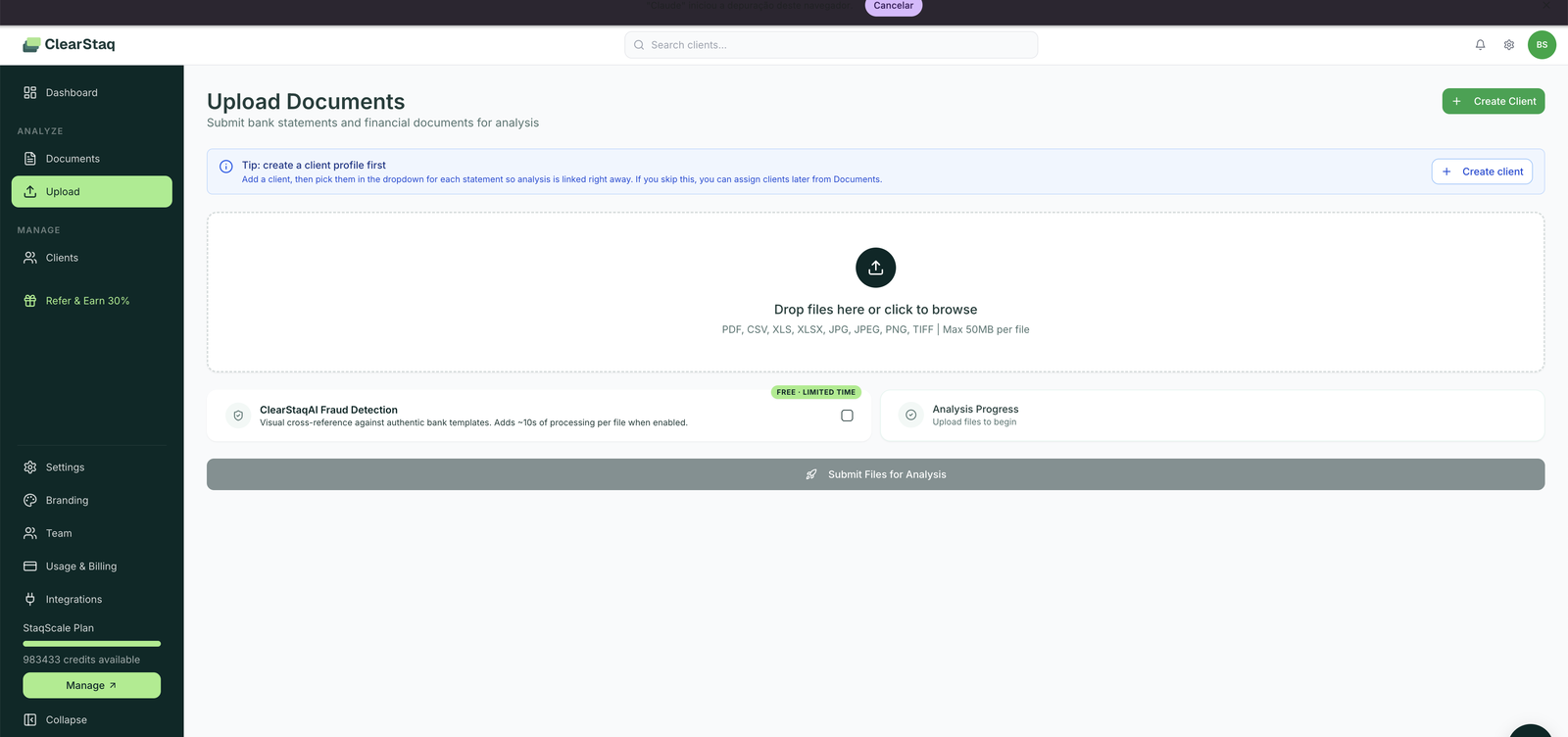
Open Upload in the sidebar.
Supported files
- Formats: PDF, CSV, XLS, XLSX, JPG, JPEG, PNG, TIFF
- Max size: 50 MB per file
- Scans and photos: fully supported. ClearStaq's OCR handles scanned paper statements, faxes, and phone photos at 99.5% extraction accuracy. Note that scanned documents limit structural fraud analysis (there's no embedded text to inspect), which ClearStaq flags transparently on the result.
Assigning a client
Pick a client from the dropdown before submitting, or let ClearStaq auto-detect the account holder from the statement itself. Auto-created clients show a review banner so you can confirm the detected details. You can also reassign any document later from the Documents page.
The ClearStaqAI fraud detection toggle
Structural checks (PDF metadata, producer fingerprints, modification timestamps) run on every document automatically. The toggle adds the second layer: AI visual analysis that cross-references the document against authentic bank templates and detects pixel-level tampering. It adds ~10 seconds per file. For underwriting decisions, leave it on.
Batch uploads
Drop in as many files as your plan allows per batch: 25 documents (StaqPro) or 100 documents (StaqScale). Statements uploaded together for the same client are grouped as one document group with a shared application date, so a 4-month submission reads as one application, not four stray files.
After processing
Every uploaded document appears in Documents with:
- Status: Analyzed or Failed (with reason)
- Fraud score: 0–100 with Low / Medium / High banding
- Health grade: A+ through F financial health score
- Bank, period, statement count, and parse time
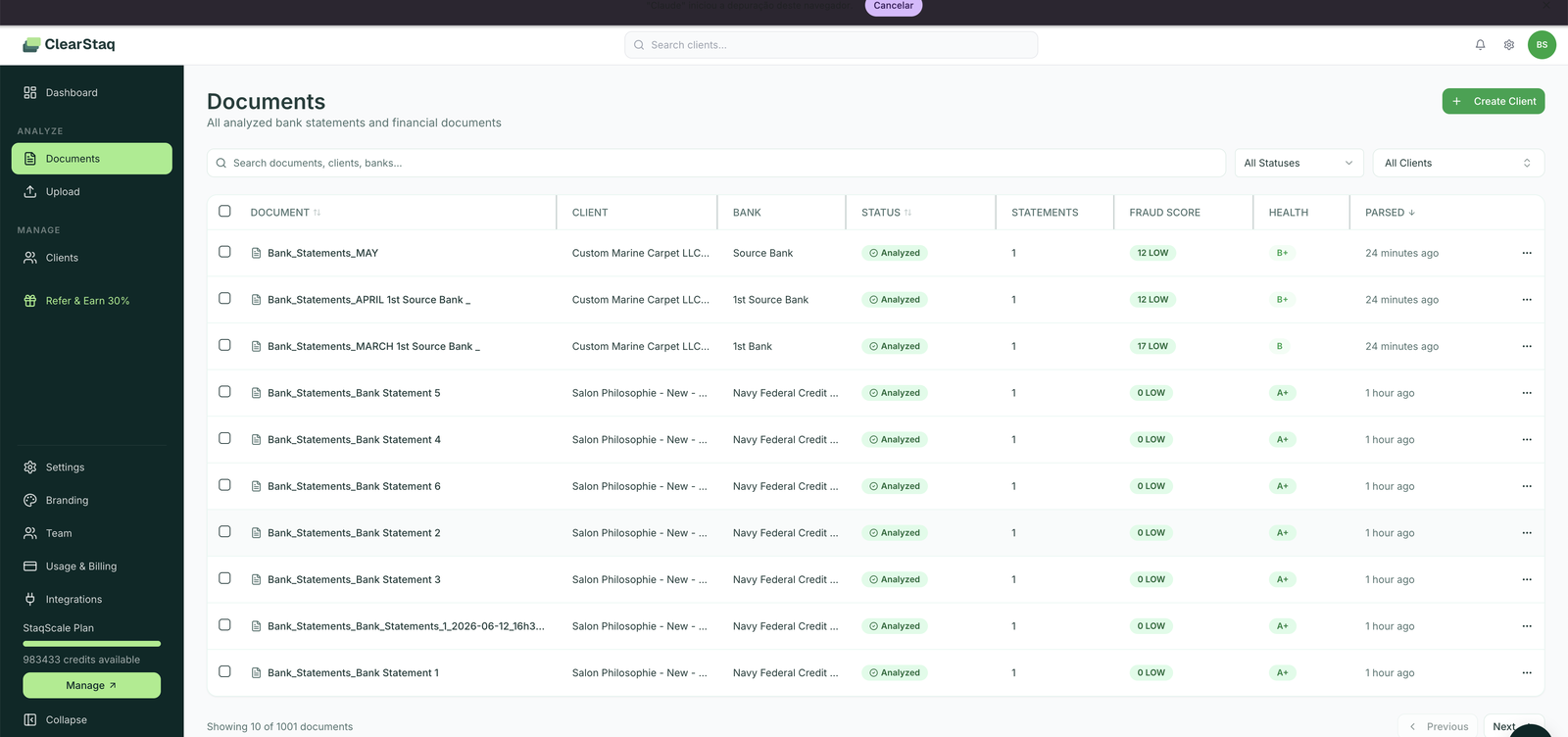
Failed documents (unreadable files, unsupported formats) don't consume credits for failed analysis attempts. Use the ⋯ menu to reassign, reprocess, or delete a document.
Reprocessing
Open any document and click Reprocess to run it through the current analysis pipeline again. This is useful after we ship parser improvements, or if you want to add ClearStaqAI fraud analysis to a document that was uploaded without it. Reprocessing costs 1 credit.
FAQ
Can I upload several months of statements at once? Yes. Upload them together and they're grouped as one application for the client. Per-month metrics show in Monthly Statement Summaries on the analysis.
What happens if a file fails? It shows as Failed in the Documents list. Common causes: password-protected PDFs, corrupt files, non-statement documents. Fix the file and re-upload.
Does ClearStaq support business and personal accounts? Yes, any bank statement from 900+ supported formats. The account holder name drives client auto-detection.
Can I delete a document? Yes, from the ⋯ menu in the Documents list. Deleting a document doesn't refund the credit.