
Getting Started
Credits & Plans
Every ClearStaq account has one analysis plan. Teams that also run applications, partners and a client portal add the optional Deal-flow add-on. It's one subscription and one invoice, with unlimited users and no fee per deal.
There is no free plan or free trial: you choose a plan when you sign up and pay in a secure Stripe checkout.
What a credit is
1 credit = 1 month of statements for one bank account, analyzed: parsing, fraud checks, MCA positions, true revenue and the report. A PDF with three months of statements for two accounts uses 6 credits.
| Action | Credits |
|---|---|
| Analyzing a month of statements for one account | 1 |
| Fast results on StaqCore | 2 per month analyzed |
| Analyzing a document again | Same as the first time |
| Viewing, downloading or exporting results | 0 |
| Dashboard, search, client management | 0 |
Where to see your balance and usage
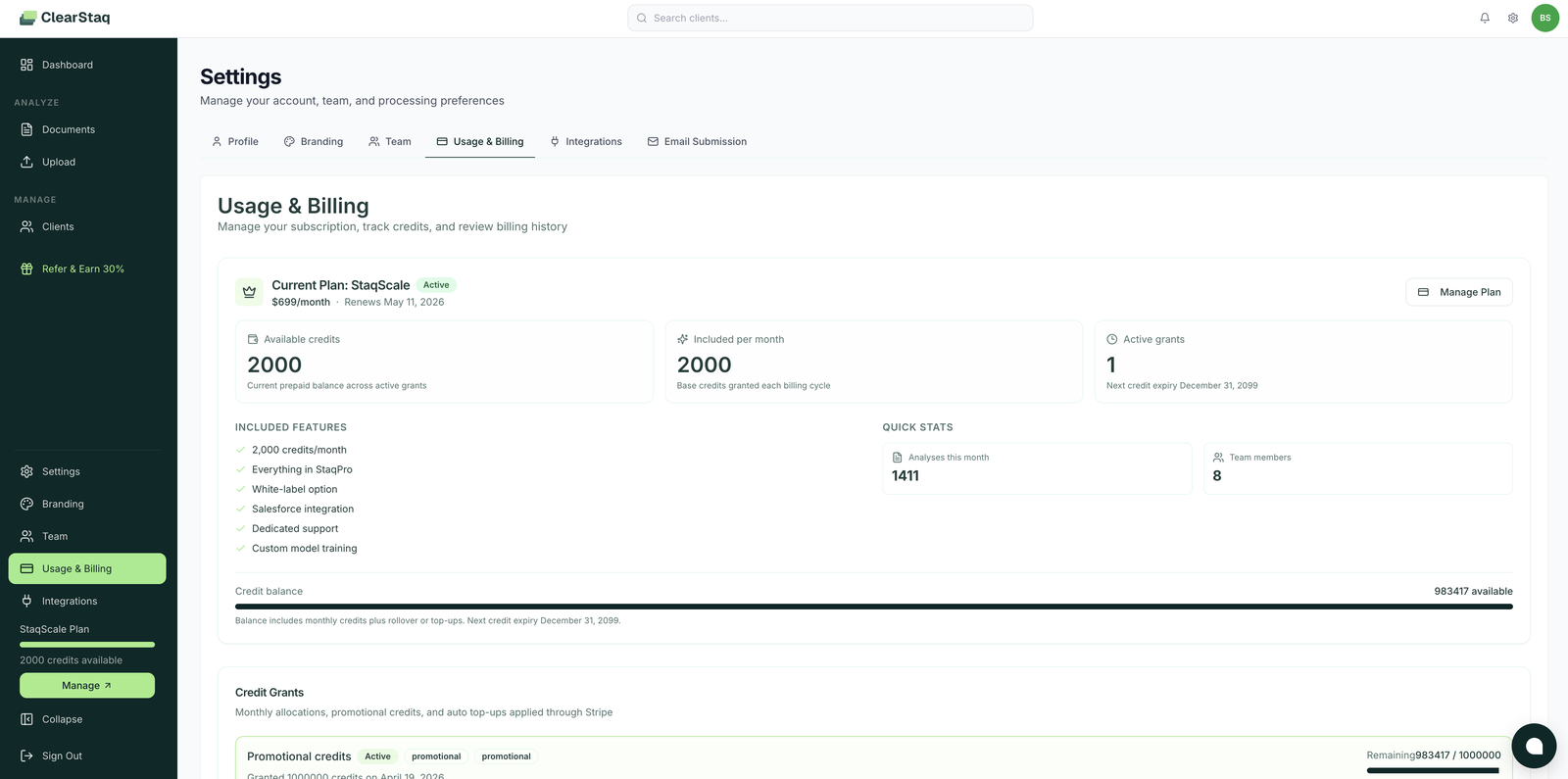
Your credit balance shows in the sidebar and in Settings → Usage & Billing. That page also shows this period's usage: credits beyond your balance, storage and, with Deal-flow, emails and API requests.
- Subscription credits arrive every month, including on yearly plans.
- Each grant is valid for 12 months; ClearStaq always uses the credits that expire soonest first.
- The Credit History table records every credit granted, spent, expired or reinstated.
Analysis plans
| StaqCore | StaqPro ⭐ | StaqScale | Enterprise | |
|---|---|---|---|---|
| Price | $99/mo ($74 yearly) | $249/mo ($187 yearly) | $699/mo ($524 yearly) | Custom |
| Credits per month | 150 | 500 | 2,000 | Custom |
| Each extra credit | $0.66 | $0.50 | $0.35 | Custom |
| Speed and queue priority | Normal | Fast | Fastest | Fastest |
| Fast results on an analysis | 2× credits | Included | Included | Included |
| Reports without watermark | Not included | |||
| File storage | 5 GB | 15 GB | 50 GB | Custom |
| Contract, limits and dedicated support | Not included | Not included | Not included |
Every plan includes businesses, owners and documents for every client; bank statement analysis, fraud detection, MCA positions, true revenue and reports; the Salesforce package; statements by email; the analysis API and webhooks; MCP for AI agents; and unlimited users.
Deal-flow add-on
Added to any analysis plan, on the same subscription.
| Deal-flow | Deal-flow Plus | |
|---|---|---|
| Price | $399/mo ($299 yearly) | $799/mo ($599 yearly) |
| Extra analysis credits on your plan | +5% | +10% |
| Emails per month | 10,000 | 30,000 |
| API requests per month | 25,000 | 100,000 |
| Applications with statuses and history | ||
| Send to partners by email, API and link; offers by email | ||
| Applications API and webhooks | ||
| Client portal with your logo and colors | ||
| Lender side: applications from brokers, decisions back to them | Not included | |
| Portal with your own domain, form, document types and branded emails | Not included | |
| Guided setup | $499 once | $499 once, included yearly |
Extra analysis credits: each month, Deal-flow adds 5% of your analysis plan's monthly credits and Deal-flow Plus adds 10%, whether you pay for the add-on or the ClearStaq team gave it to you. If you have both, only the higher tier counts. Included per month in Settings → Usage & Billing shows the total and where it comes from, for example "2,000 from StaqScale + 200 from Deal-flow Plus".
Statements that arrive through the portal, the API or email use your analysis plan's credits.
After adding Deal-flow, follow the Deal-flow Setup Checklist to set up your client portal, partners and, with Plus, applications from brokers.
Usage beyond what's included
Your work never stops when you go past what's included. The extra is billed on your next invoice:
| Usage | Beyond what's included |
|---|---|
| Analysis credits | Your plan's extra-credit rate |
| Storage (your files plus 5% for analyzed data) | $2 per GB per month |
| Emails ClearStaq sends on your behalf (Deal-flow) | $3 per 1,000 |
| Applications API requests (Deal-flow) | $1 per 10,000 |
- We email the account's billing contacts at 80% and 100% of what's included.
- If usage in one month reaches $500, it's invoiced right away instead of at the end of the month.
- Storage: when you go over, 1 GB is added right away and stays on; it comes off after a full month below what's included. Document retention, in Settings → Profile, sets how long original files are kept, which helps keep storage low.
- Received emails, webhooks and deliveries to partners don't count.
Changing plans
In Settings → Usage & Billing you can change your plan, switch between monthly and yearly, and add, change or remove Deal-flow at any time.
- Upgrades (a higher plan, or yearly instead of monthly) start a new period the day you change. The new plan is charged in full, renews one period from that day, and its credits are added right away. The credits you already have stay; the unused time of your old plan is not credited. The upgrade goes through once the charge is paid.
- Adding Deal-flow, moving up to Deal-flow Plus, or paying for Deal-flow yearly instead of monthly starts the day you change. The rest of the current period is charged to your card, and it renews with your plan.
- Downgrades (a lower plan, or monthly instead of yearly), moving down to Deal-flow, and removing Deal-flow start when the period you paid for ends. Until then you keep what you have, including your current plan's credits.
- Renewals add the credits of the plan the renewal invoice charges.
- The Deal-flow add-on card marks Current only on your tier at the interval you're billed. The same tier at the other interval offers Switch to yearly or Switch to monthly. A tier the ClearStaq team gave you shows Given by ClearStaq, and the card can't change it.
- Nothing is refunded when you change plans.
- If a payment fails, new analyses pause until the open invoice is paid.
FAQ
Do unused credits roll over? Yes. Each month's credits stay in your balance for 12 months from the day they were added.
What happens if I run out of credits mid-month? Nothing stops. Analyses keep running and the extra credits are billed at your plan's rate on your next invoice.
Is a multi-month statement one credit or several? Several: one credit per month of statements for each bank account. Three months of one account is 3 credits.
Can I change plans mid-cycle? Yes, from Settings → Usage & Billing. Upgrades and adding Deal-flow start the day you change; downgrades and removing Deal-flow start when the period you paid for ends. Nothing is refunded.