
Integrations
API & Webhooks
Everything the dashboard does, the REST API does too: submit statements, retrieve full analyses, and receive webhook callbacks the moment processing finishes. One endpoint in, structured JSON out.
API keys
Manage keys under Settings → Integrations → API Keys:
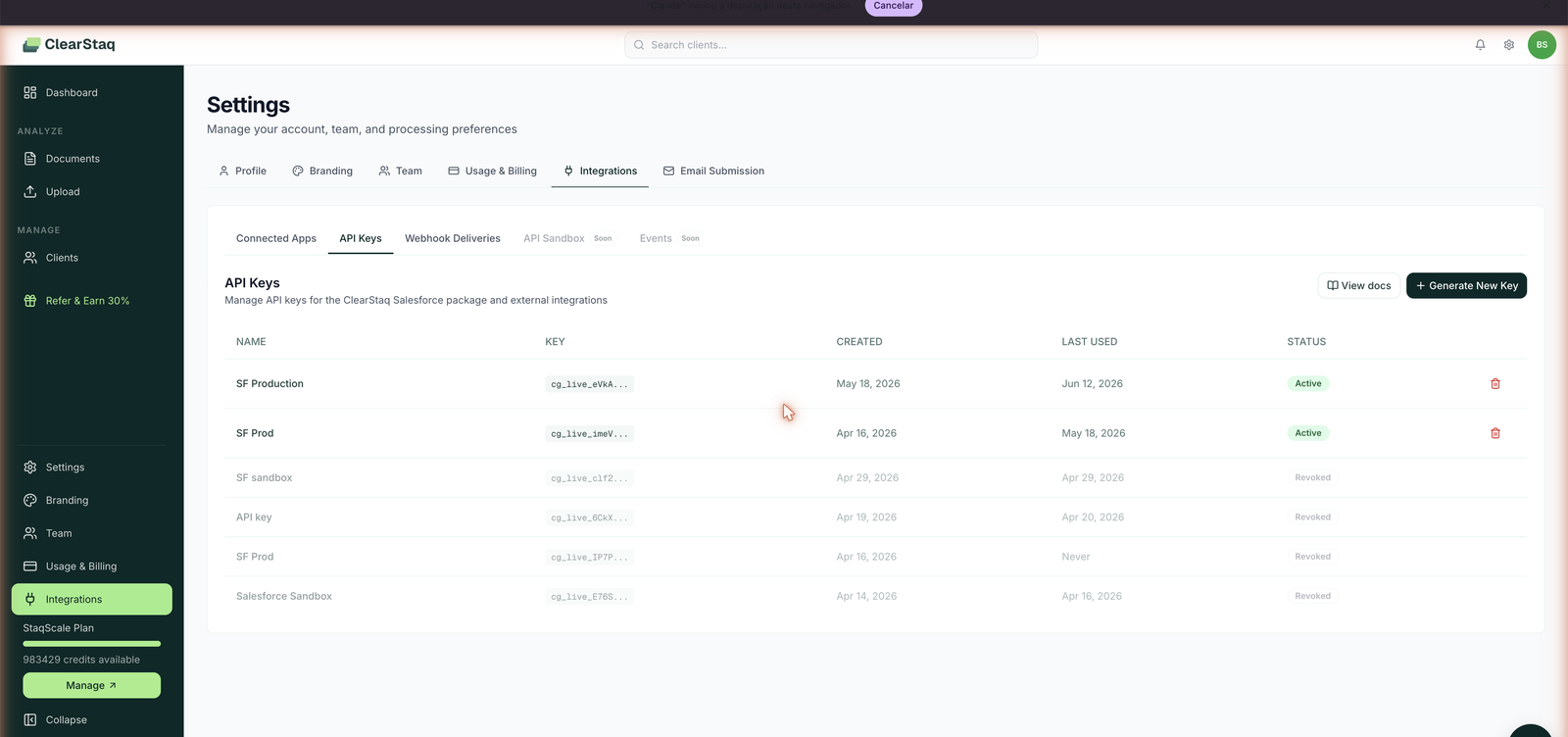
- Keys are prefixed
cg_live_…and shown once at creation, so store them in your secrets manager. - Each key shows created and last used timestamps, so stale keys are easy to spot.
- Revoke any key instantly; create as many named keys as you need (one per environment/integration is good practice).
- Rate limits by plan: 60 req/min (StaqCore), 200 req/min (StaqPro), unlimited (StaqScale).
Submitting a statement
The required document_kind field identifies the document being submitted. /api/v1/analyses accepts bank_statement, tax_return, and application_form; /api/v1/clients accepts only bank_statement. Submit tax returns and application forms to /api/v1/analyses. A missing or endpoint-incompatible value returns 400 invalid_document_kind.
Submit via the public API with a callback_url for the webhook. Conceptually:
curl -X POST https://app.clearstaq.com/api/v1/analyses \
  -H "Authorization: Bearer cg_live_YOUR_KEY" \
  -F "[email protected]" \
  -F "document_kind=bank_statement" \
  -F "callback_url=https://yourapp.com/webhooks/clearstaq" \
  -F "client_ref=deal-4821" \
  -F 'metadata={"loan_id":"LN-999"}' \
  -F "clearstaq_ai_enabled=true"
The endpoint returns 202 Accepted with an analysis id; the full result arrives asynchronously at your callback_url. clearstaq_ai_enabled opts that submission into the ClearStaqAI visual fraud second-pass (defaults to off; the metadata fraud score always runs). Maximum upload size 25 MB, application/pdf only.
Full request parameters, response schemas, and runnable cURL/Node/Python examples live in the API Reference.
Businesses & submissions
A business is a company your organization works with (legal name, DBA, EIN, address, industry). Its documents are grouped into submissions, numbered #1, #2, and so on:
- A business has at most one open submission at a time, and new documents go into it.
- When your team marks that submission funded or lost in the webapp, it stops receiving documents. The next document for the business opens the next number.
A submission is a client. Every submission has a client_id, and the client endpoints (GET /api/v1/clients/{id} for the aggregated profile, GET /api/v1/clients/{id}/open-banking for the open-banking envelope) work on it. POST /api/v1/clients works as before: it creates a client that is not linked to a business yet, which appears in the webapp under Clients → Needs review until your team links it to one.
| Endpoint | Scope | What it does |
|---|---|---|
GET /api/v1/businesses | analyses:read | Lists your businesses, newest first, with each one's open submission and number of submissions. Supports page, per_page (up to 100), and search (legal name or DBA). |
POST /api/v1/businesses | analyses:write | Creates a business and its submission #1. An EIN you already have returns 409 business_exists; without an EIN, the same name and address returns 409 possible_duplicate (retry with ?force=true to create it anyway). |
GET /api/v1/businesses/{id}/submissions | analyses:read | Lists every submission of a business, newest first, with its number, client_id, status, and source. |
GET /api/v1/people/{id} | analyses:read | Returns an owner or officer with the businesses they are linked to. |
POST /api/v1/analyses with business_id | analyses:write | Files the document into the business's open submission, or opens the next one when none is open. The response adds submission with client_id, number, and created. |
To send documents for a business you already have, find its id with GET /api/v1/businesses and pass it as business_id:
curl -X POST https://app.clearstaq.com/api/v1/analyses \
  -H "Authorization: Bearer cg_live_YOUR_KEY" \
  -F "[email protected]" \
  -F "document_kind=bank_statement" \
  -F "business_id=<business_id>"
An unknown business_id, or one from another organization, returns 404 business_not_found before anything is stored or billed. A key only ever sees its own organization: businesses and people of other organizations answer 404, like ids that do not exist. The full EIN is never returned, only its last four digits.
Webhook events
Every API-submitted statement triggers exactly one of two events at your callback_url:
| Event | When | Payload includes |
|---|---|---|
analysis.completed | Statement analyzed successfully | analysis ID, bank, period, scorecard, debt rollups (MCA positions / stacking data) |
analysis.failed | Analysis failed (unreadable PDF, unsupported bank, internal error) | error code + human-readable reason |
Signature verification
Payloads are signed with HMAC-SHA256 using your API key secret. Verify the signature header on every delivery before trusting the payload:
import hmac, hashlib

def verify(payload_bytes, signature_header, api_secret):
    expected = hmac.new(api_secret.encode(), payload_bytes, hashlib.sha256).hexdigest()
    return hmac.compare_digest(expected, signature_header)
Delivery monitoring
Settings → Integrations → Webhook Deliveries logs every outbound webhook attempt for API-submitted statements. It's your first stop when a callback "didn't arrive." (If the log shows a delivery and your endpoint has nothing, the problem is on the receiving side.)
Retrieving results without webhooks
Poll GET /api/v1/analyses/{id} by ID, or pull any analysis as JSON from the dashboard. For a completed bank statement, the API returns the analysis.completed shape with status and result; for a completed tax return or application form, it returns the corresponding extraction shape when its persisted rows are available. A completed tax return with no extracted rows follows the same analysis.completed callback envelope backed by its persisted tax analysis anchor; it does not return a fabricated empty extraction event. A successful application-form callback persists one extraction row even when all fields are null. If that row is unavailable later, the terminal API fallback is application_form.extracted with data: [].
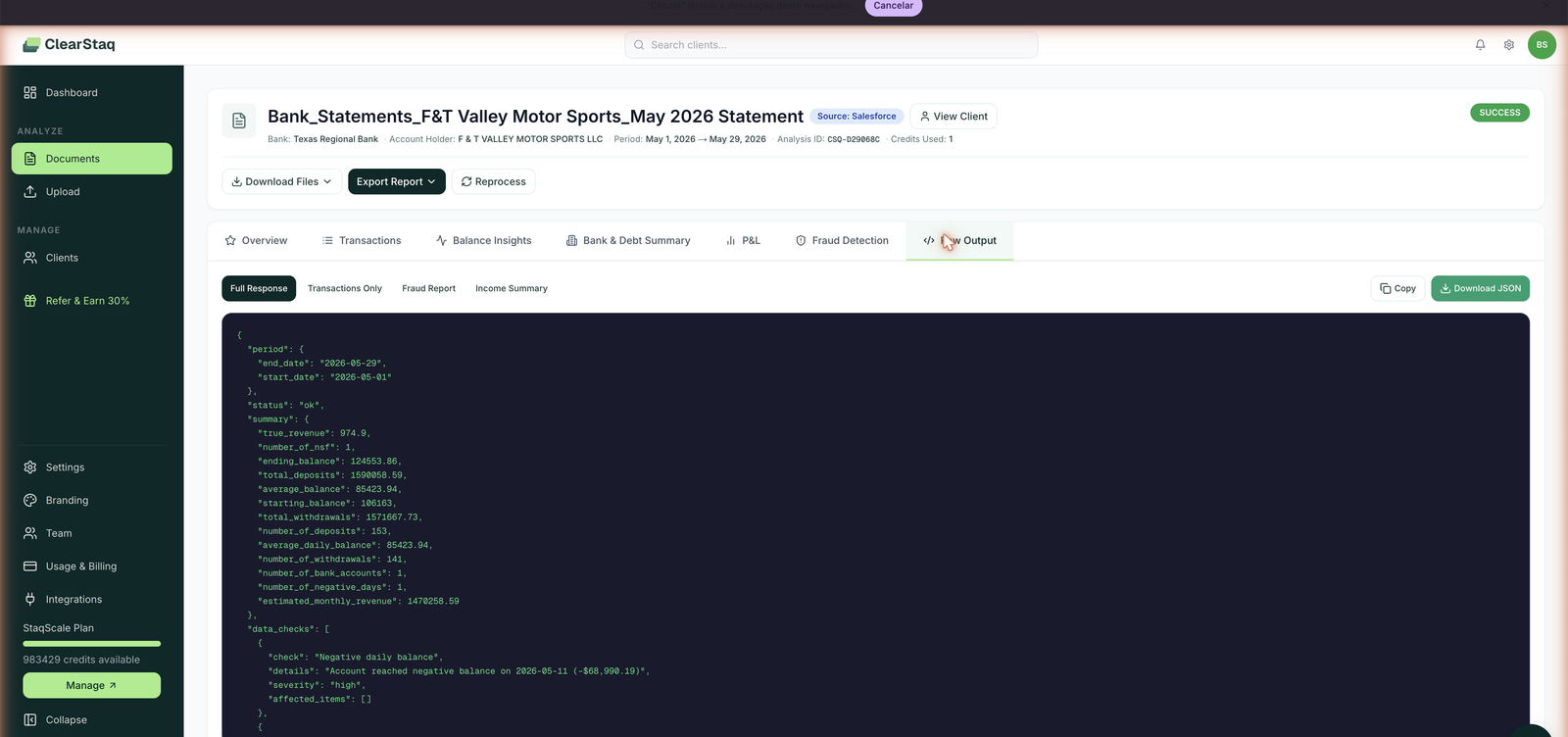
Every document's Raw Output tab offers four views (Full Response, Transactions Only, Fraud Report, Income Summary) with one-click Copy and Download JSON. The Raw Output of a real document is the best living reference for payload shapes while you build.
Coming soon
The Integrations page lists an API Sandbox (test without consuming credits) and an Events stream as upcoming. Watch the changelog.
FAQ
Does an API-submitted statement cost the same? Yes, 1 credit per analyzed document, identical to web upload.
How fast is the webhook after submission? Analysis completes in under 5 seconds for most statements (~15s with visual fraud analysis), and the webhook fires immediately after.
What happens if my endpoint is down? The attempt is recorded in Webhook Deliveries. Build your endpoint to return 2xx quickly (enqueue, then process) and use the analysis ID to fetch anything you missed.
Can I tell which key made which calls? Each key tracks last-used; use one key per integration for clean attribution and painless rotation.
Is there a sandbox? Listed as coming soon. Until then, test with real statements in your workspace or use Raw Output JSON from existing analyses as fixtures.