
Getting Started
Quickstart: Your First Statement in 5 Minutes
This guide takes you from a fresh account to your first analyzed bank statement. Total time: about 5 minutes. The analysis itself takes under 5 seconds.
What you'll need
- A ClearStaq account (get started; plans from $99/month)
- A bank statement in PDF, CSV, XLS/XLSX, or image format (JPG, PNG, TIFF; scans and photos work)
Step 1: Open the Upload page
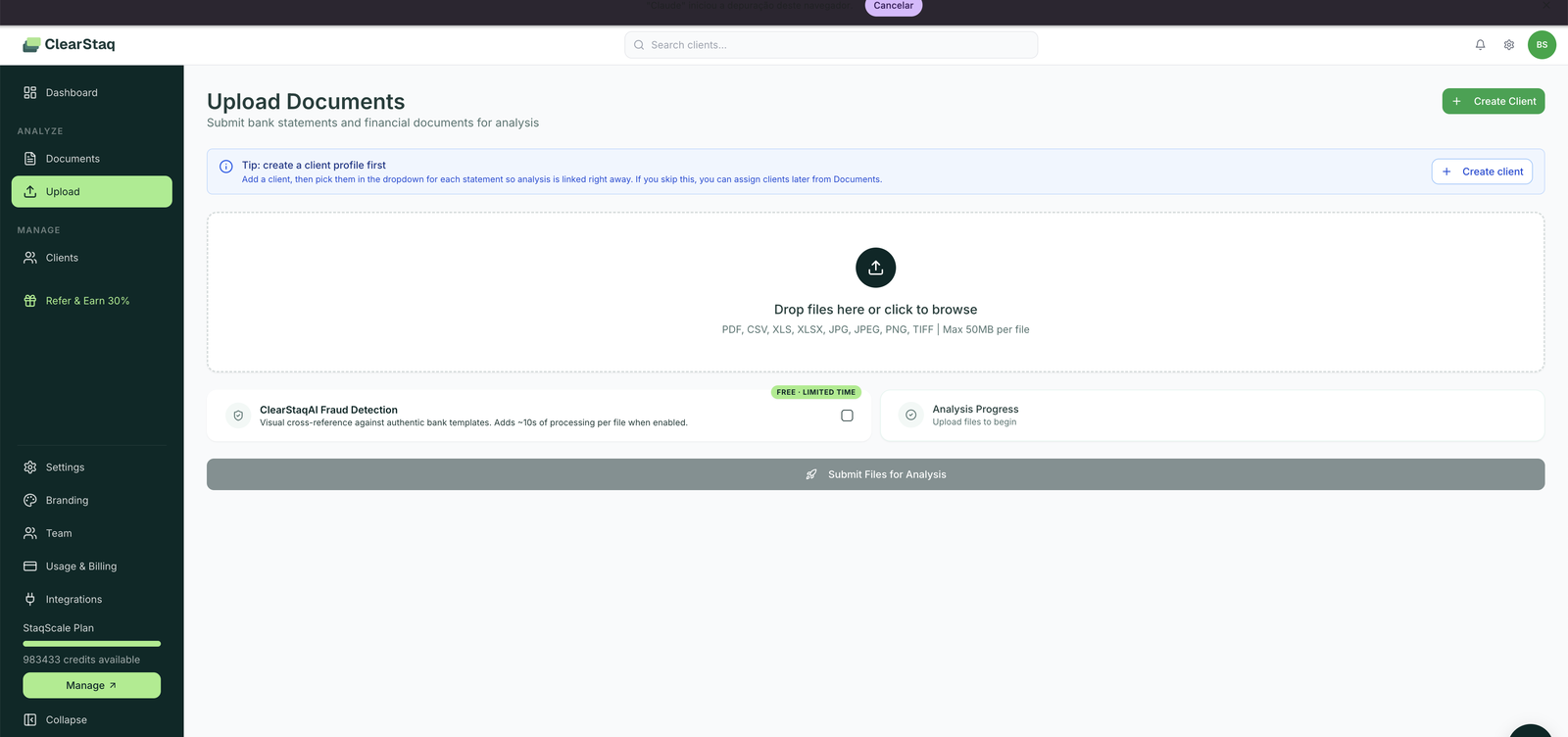
From the sidebar, click Upload under the Analyze section.
Step 2: (Optional but recommended) Create a client first
Click Create client in the tip banner and enter the business name. When you pick the client in the dropdown, every statement you upload is linked to their profile right away.
If you skip this, ClearStaq auto-detects the account holder from the statement and creates a client profile for you. You'll see a "review and confirm" banner on auto-created clients.
Step 3: Add your files
Drag and drop one or more statements into the upload area, or click to browse.
- Formats: PDF, CSV, XLS, XLSX, JPG, JPEG, PNG, TIFF
- Size limit: 50 MB per file
- Multiple months for the same business? Upload them together, and they're grouped as one application.
Step 4: Decide on AI fraud detection
The ClearStaqAI Fraud Detection toggle adds a visual cross-reference of your document against authentic bank templates, catching pixel-level edits that structural checks can't see. It adds roughly 10 seconds of processing per file.
Structural fraud checks (PDF metadata, editing-tool fingerprints, modification timestamps) run on every document automatically, with or without the toggle.

Step 5: Submit and watch it process
Click Submit Files for Analysis. The Analysis Progress panel tracks each file. Under 5 seconds per statement later, you'll have:
- Parsed data: every transaction extracted and categorized
- Key financial metrics: estimated monthly revenue, true revenue, average daily balance, NSF count, negative balance days
- MCA intelligence: existing positions detected, stacking risk flagged
- Fraud signals: any structural red flags, with plain-English explanations
Step 6: Open your analysis
Go to Documents in the sidebar and click your statement, or open the client profile from Dashboard.
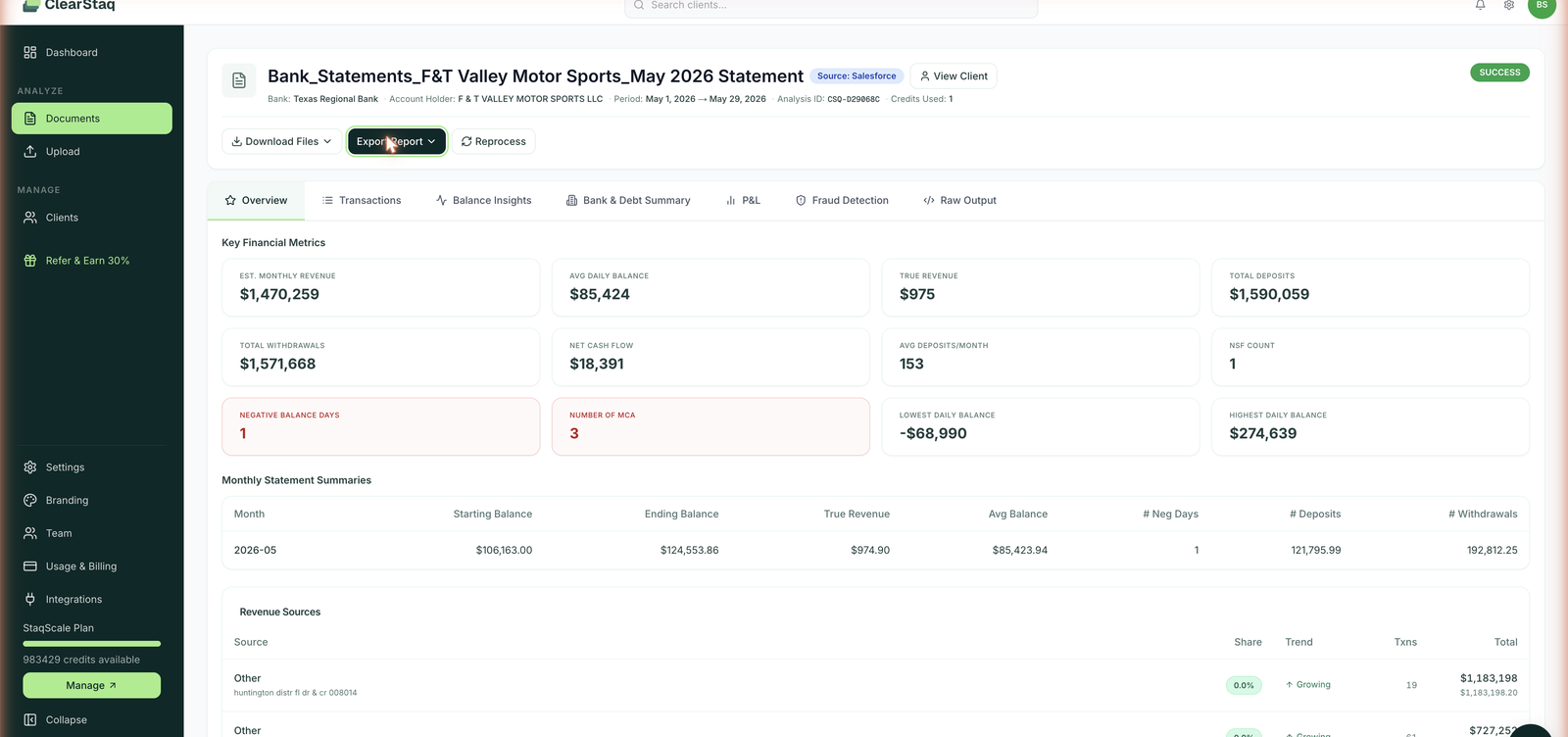
Start with the Overview tab. Here's what every metric means.
Credits: what just happened
Each analyzed document used 1 credit, regardless of page count. A 40-page statement and a 2-page statement both cost 1 credit. Viewing results, re-downloading files, and exporting reports never use credits. More on credits and plans
Next steps
- Understand the fraud detection results
- Read the stacking detection alert
- Email statements instead of uploading
- Export a branded report
- Set up Deal-flow: client portal, applications and partners
FAQ
How long does analysis take? Under 5 seconds per statement for parsing and structural checks. Enabling ClearStaqAI visual fraud detection adds about 10 seconds per file.
What banks are supported? 900+ bank statement formats, including all major US banks and credit unions. Scanned and photographed statements are supported via AI-powered OCR.
How do I pay for an account? You choose a plan and pay when you sign up: StaqCore $99/month (150 credits), StaqPro $249/month (500 credits), or StaqScale $699/month (2,000 credits). Paying yearly takes 25% off. Enterprise pricing is custom.
What counts as one credit? One document analyzed = one credit, regardless of page count or document type. Nothing else consumes credits.
Can my whole team use one account? Yes. Invite teammates under Settings → Team. Every plan supports multiple users.