
Understanding Your Analysis
Transactions, Income Analysis & P&L
Three views answer "where does the money actually come from and go": the raw transaction ledger, the income analysis, and the categorized P&L.
Transactions explorer
Available on both levels:
- Document → Transactions: every parsed transaction from that statement
- Client → Transactions: all statements merged into one ledger
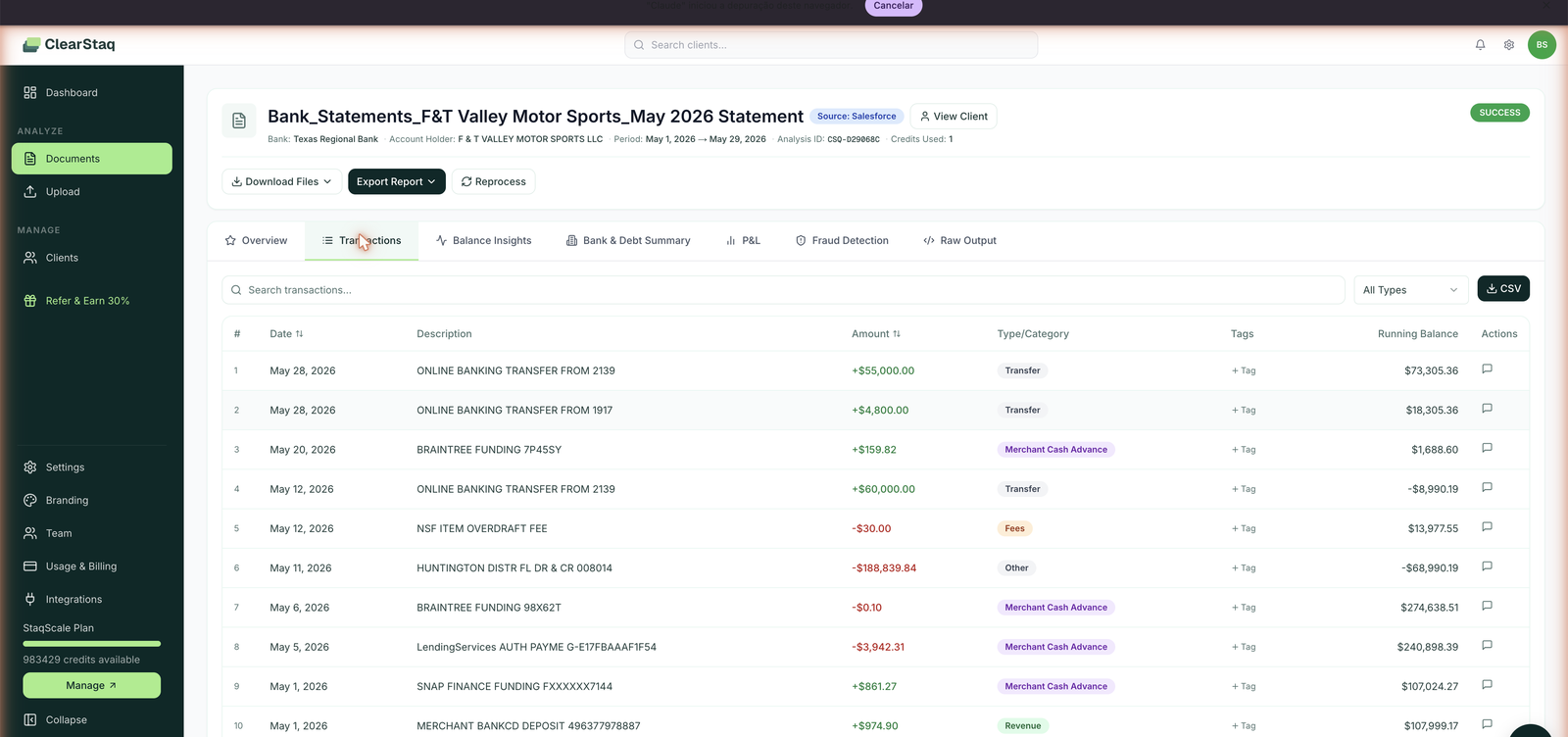
Search and filters
- Full-text search across transaction descriptions
- Category filter: Transfer, Non-Traditional Loan (advances), Fees, Revenue, Other…
- Type: All / Deposits / Withdrawals
- Amount range and Date range
Every row shows date, full description as printed on the statement, detected category, deposit/withdrawal type, and amount. This is where you verify any number the summary gives you. It's two clicks from metric to underlying transactions.
Income Analysis (client level)
The client's Income Analysis tab aggregates revenue across all their statements:
- Monthly Revenue Trend: revenue plotted month by month across every statement on file
- Revenue Source Breakdown: each identified deposit stream with share of total, transaction count, dollar total, and a trend direction (Growing / Declining / Stable)
The trend column is the underrated part: a merchant whose biggest revenue source is Declining while total revenue holds flat is replacing quality revenue with something else. That's worth two minutes of reading the sources.
Advance exclusion: advance proceeds are excluded from all revenue figures and the exclusion count is shown explicitly (e.g. "Excluded: 12 Advance-related txns"), so the income picture is never inflated by borrowed money.
P&L view (document level)
The P&L tab restates the statement as an income statement:
- Total Income / Total Expenses / Net Income headline cards
- Income Breakdown by category, each expandable to its transactions, with share of income
- Expense Breakdown by category, same drill-down
It's a cash-basis P&L built purely from the bank ledger, best used for sanity-checking the merchant's claimed financials ("your P&L says $80K monthly costs; the bank shows $130K leaving the account").
FAQ
How accurate is transaction categorization? Categorization runs on ClearStaq's models tuned on lending-relevant categories (StaqVerify). Every category is verifiable: click through to the transactions and read the descriptors.
Can I recategorize a transaction? Not currently in the UI, but because every metric links back to its transactions, you can always verify and adjust in your own credit memo. Custom categorization rules are part of custom fraud/underwriting rules on StaqScale.
Can I export transactions? Yes: Export Report → Transactions (CSV) on any document, or the client-level CSV from the dashboard. Also available as JSON via Raw Output and the API.
Why do client-level numbers differ from a single document's? Client level aggregates all statements on file; a document is one period. Same engine, different windows.