
Understanding Your Analysis
Fraud Detection (StaqGuard)
A sophisticated fake statement passes human review more often than anyone admits. StaqGuard runs 27 signals across two independent layers on your documents and explains every finding in plain English, so the decision stays yours, but nothing slips by unseen.
The two layers
Layer 1: Structural & metadata forensics (automatic, every document)
Before reading a single transaction, ClearStaq inspects the file itself:
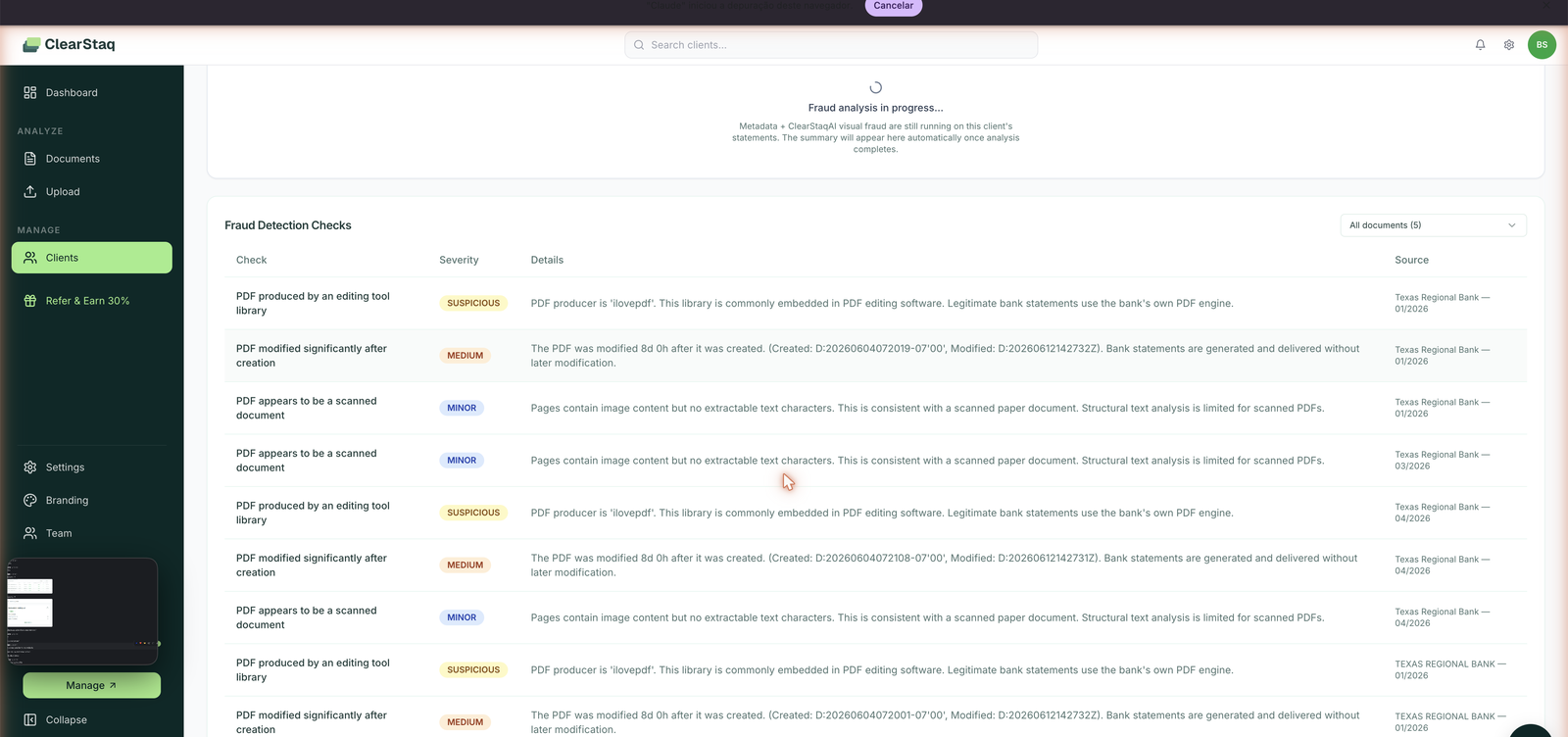
- PDF producer fingerprinting: legitimate bank statements are generated by the bank's own PDF engine. A producer string from an editing tool (iLovePDF, online editors, desktop PDF software) means the file was touched after the bank produced it.
- Modification timestamps: banks generate and deliver statements once. A PDF modified days after its creation date is a red flag, and ClearStaq shows you both timestamps.
- Scanned-document detection: pages with image content but no extractable text are flagged transparently, because structural analysis is inherently limited on scans (the visual layer below matters more there).
- Font, layout, and internal-consistency checks: mismatched fonts, broken layouts, and figures that don't reconcile.
Layer 2: ClearStaqAI visual analysis (the upload toggle)
The AI layer renders the document and cross-references it against authentic bank templates, detecting pixel-level edits (an altered transaction amount, a pasted-in row, a doctored balance) that leave no structural trace. Enable it with the ClearStaqAI Fraud Detection toggle at upload (~10 seconds extra per file), or run it later via Reprocess.
Reading the results
Severity levels
Every finding carries a severity and a human-readable explanation:
| Severity | Meaning | Example finding |
|---|---|---|
| SUSPICIOUS | Strong tampering indicator; review before any decision | "PDF producer is 'ilovepdf'. This library is commonly embedded in PDF editing software. Legitimate bank statements use the bank's own PDF engine." |
| MEDIUM | Inconsistent with how banks deliver statements | "The PDF was modified 8d 0h after it was created. Bank statements are generated and delivered without later modification." |
| MINOR | Context that limits or frames the analysis | "Pages contain image content but no extractable text characters. This is consistent with a scanned paper document." |
The fraud score
Each document gets a fraud score from 0–100, banded Low / Medium / High, shown in the Documents list and on the document's Fraud Detection tab.
Client Fraud Summary
On a client's Risk Profile tab, ClearStaq aggregates metadata and visual findings across every statement the client has submitted, so a clean January statement doesn't bury a doctored March one. The client-level view also shows Max Fraud Score (the worst statement in the batch), NSF count, and negative balance days, plus Data Quality Checks (e.g. "One day with negative closing balance detected on 2026-02-17").
What to do with a flagged statement
A fraud flag is a signal for human review, not an automatic decline. Recommended flow:
- Read the specific findings: "modified after creation" plus "editing-tool producer" together is far stronger than either alone.
- Ask the merchant for the statement directly from their online banking (download, not print-and-scan).
- Compare the two versions: differences in amounts or transactions are your answer.
- Add what you find as a note on the client profile, so your team sees it on every future deal.
FAQ
Does fraud detection run on every document? Layer 1 (structural/metadata) runs automatically on every upload. Layer 2 (ClearStaqAI visual) runs when the toggle is enabled at upload, or via Reprocess afterwards.
What does "fraud analysis was skipped" mean on a document? The ClearStaqAI visual layer wasn't enabled for that upload. Structural findings still appear on the client's Risk Profile. Reprocess the document with the toggle on to add visual analysis.
Can a legitimate statement trigger flags? Yes. For example, a broker who merges PDFs before uploading introduces an editing-tool fingerprint. That's exactly why findings come with explanations: you can identify benign causes. Best practice is uploading original, unmerged bank PDFs.
What's the catch rate? StaqGuard detects 95%+ of altered documents in our testing, and the two-layer design (structural + visual) minimizes false positives: each layer cross-validates the other.
Are my documents used to train models? No. Customer documents are never used to train models. See clearstaq.com/security.