
Account & Billing
Team, Roles & Permissions
Every ClearStaq plan supports your whole team, with no per-seat fees. Manage members under Settings → Team.
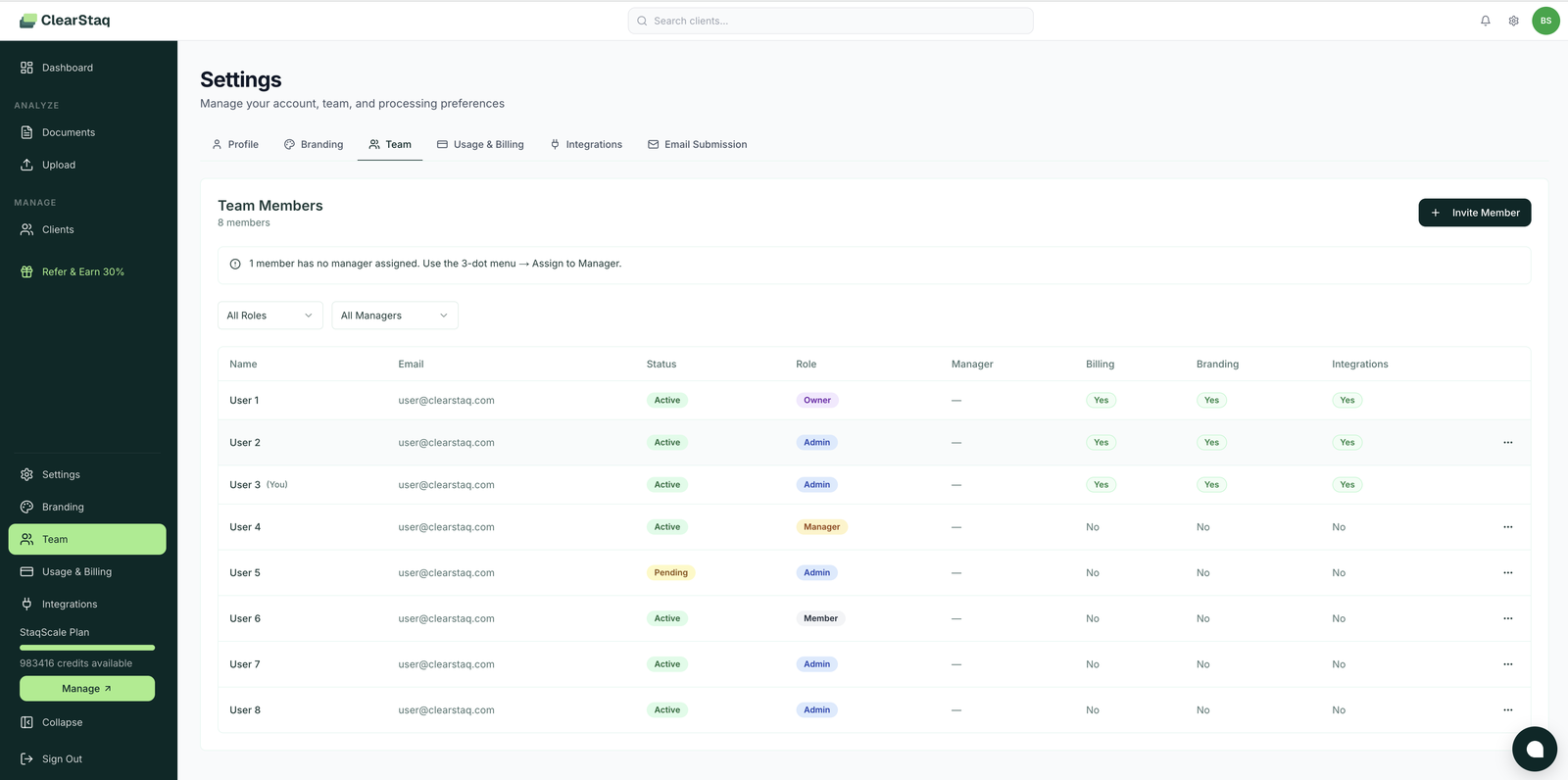
Inviting members
Click Invite Member, enter their email, pick a role. They appear as Pending until they accept; pending invites can be resent or revoked from the row's ⋯ menu.
Roles
| Role | Intended for |
|---|---|
| Owner | The account principal: full control, including ownership transfer. One per org. |
| Admin | Leadership/ops: full client visibility, team management. Automatic access to every client. |
| Manager | Team leads: manage their assigned members' work. |
| Member | Analysts/underwriters: day-to-day uploading and analysis. |
Granular permission toggles
Independent of role, each member has three sensitive-area switches, visible as columns in the team table:
| Permission | Grants access to |
|---|---|
| Billing | Plans, credits, payment methods (Settings → Usage & Billing) |
| Branding | Watermark and logo settings (Settings → Branding) |
| Integrations | API keys, webhooks, connected apps (Settings → Integrations) |
So you can have an Admin who runs the team but can't touch billing, or a Member who manages API keys without seeing financials.
Manager assignment
Assign each member to a manager via the row's ⋯ menu → Assign to Manager. The page warns when members are unassigned. This drives team-level reporting and keeps review chains explicit.
Two layers of access control
- Org-wide (this page): role + permission toggles.
- Per-client (client Access tab): restrict specific clients to specific people. Owner and Admins always see everything; Members see what they're granted.
FAQ
Is there a seat limit? No per-seat pricing. Invite your whole team on any plan.
Can someone belong to two organizations? Yes. Each invite is per organization; they'll switch context at login.
What happens to a removed member's work? Documents, analyses, clients, and notes all belong to the organization and remain untouched.
Who can invite members? Owner and Admins.