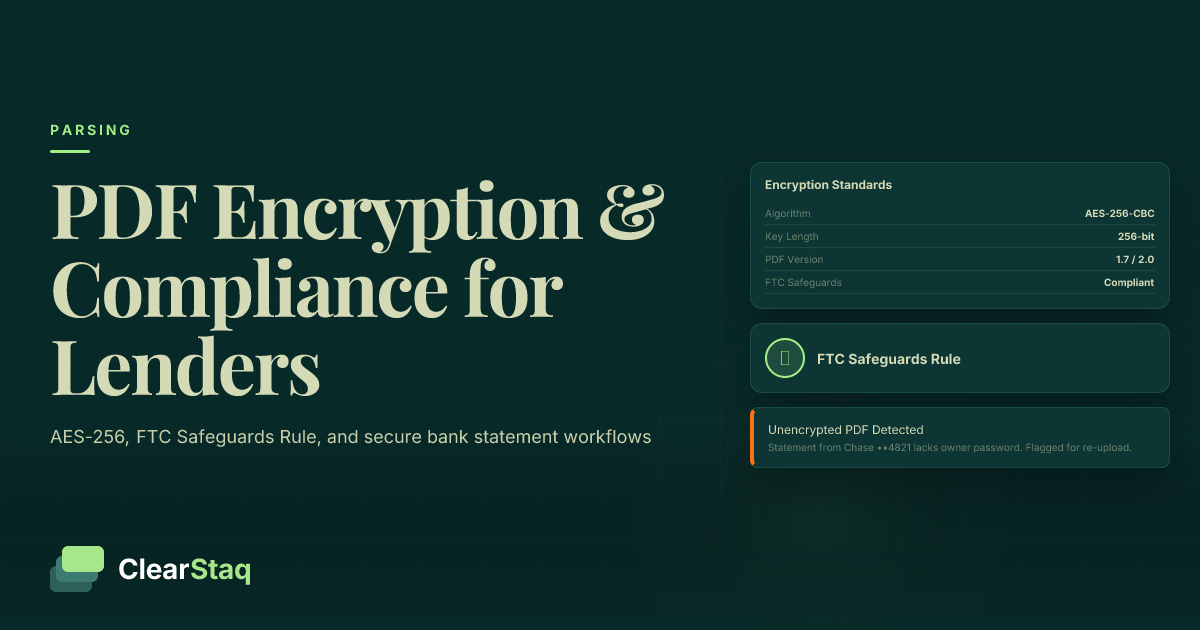
PDF password protection for bank statements requires AES-256 encryption, secure portal transmission (never email), and compliance with the FTC Safeguards Rule and SOC2 standards. Lenders should implement document-open passwords, permissions restrictions, watermarking, and audit trails — and ensure any automated parsing platform handles encrypted documents without storing them beyond processing.
What you'll learn
- AES-256 is the required encryption standard for bank statement PDFs — RC4 is broken and AES-128 falls below what financial regulators expect for NPI
- Email is not a secure channel for bank statements, even when the PDF is password-protected, and may violate the FTC Safeguards Rule
- The FTC Safeguards Rule requires non-bank financial institutions to encrypt customer financial data in transit and at rest under a written information security program
- A password-protected PDF is not inherently legitimate — fraudsters use encryption to conceal altered metadata, making fraud detection a separate and necessary control
- Automated bank statement parsing platforms should accept document passwords as encrypted API parameters, decrypt in memory, and discard the original PDF and password after processing
PDF password protection for bank statements requires AES-256 encryption, secure portal transmission (never email), and compliance with the FTC Safeguards Rule and SOC2 standards. Lenders should implement document-open passwords, permissions restrictions, watermarking, and audit trails — and ensure any automated parsing platform handles encrypted documents without storing them beyond processing.
Why Bank Statement PDF Security Matters More Than Ever
Bank statements are among the most sensitive documents a lender ever handles. A single statement reveals account numbers, running balances, recurring payments, and months of transaction history — exactly the data a fraudster or identity thief needs to cause serious harm.
The financial stakes are real. According to IBM's Cost of a Data Breach Report, the average breach cost for financial services organizations now exceeds $5.9 million per incident. For smaller lenders and fintechs, a single exposure event can trigger regulatory penalties, breach notification costs, and reputational damage that far outweigh the cost of prevention.
Regulators are paying attention. The FTC's updated Safeguards Rule, which took full effect in 2023, explicitly requires non-bank financial institutions to encrypt non-public personal information (NPI) in transit and at rest. Bank statements submitted by loan applicants are NPI. There's no ambiguity.
The dual risk is worth naming directly. Inadequate security creates obvious exposure. But an over-reliance on password protection — treating it as a complete solution — creates a false sense of security that can be just as dangerous. PDF password protection is a necessary control, not a sufficient one.
The Lending-Specific Risk Profile
Consumer-facing password protection guides don't address the reality of lending operations. A lender processing 500 applications a month handles 500 or more bank statement PDFs — each containing the financial history of an individual or business applicant. That's a high-value target, concentrated in one place.
Unlike individual consumers sharing a single file, lenders face regulatory obligations for every document they handle. The Gramm-Leach-Bliley Act (GLBA) and SOC2 requirements apply at the organizational level — not just to individual file transfers. A systematic failure in document handling isn't just an IT problem; it's a compliance failure.
A single unsecured email containing a bank statement PDF can trigger breach notification obligations under state data privacy laws, including CCPA in California and VCDPA in Virginia. For high-volume lenders, this risk is multiplied across every application in the pipeline.
The Fraud Angle: Password Protection as a Double-Edged Sword
Here's a risk that no general PDF security guide covers: fraudsters sometimes password-protect fabricated or altered bank statement PDFs deliberately. By encrypting the file, they make it harder for a recipient to run quick metadata checks or inspect the document's creation history.
A password-protected PDF is not a legitimate one by definition. Protection proves only that someone set a password — not that the underlying document is authentic. Underwriters who treat password protection as a signal of document legitimacy are making a category error.
This is where PDF metadata analysis becomes critical. When a document is decrypted and examined, its creation software, modification timestamps, and font data can reveal manipulation that password protection was designed to conceal. Security controls and fraud detection are related but distinct concerns — both are required for a complete document handling posture. For a comprehensive look at document authenticity, see our guide to fake bank statement detection.
What Is PDF Password Protection? Encryption Standards Explained
PDF password protection uses encryption to restrict access to or modification of a PDF document. When you apply a password to a PDF, the document's contents are encrypted using a cryptographic algorithm — anyone without the correct password cannot read the file.
But not all PDF encryption is equal. The algorithm and key length used determine how secure the protection actually is. Understanding the difference matters enormously when handling financial documents.
| Encryption Standard | Key Length | Security Level | Recommended for Financial Docs? |
|---|---|---|---|
| RC4 | 40-128 bit | Broken — do not use | No |
| AES-128 | 128 bit | Acceptable for low sensitivity | Not recommended for NPI |
| AES-256 | 256 bit | Gold standard | Yes — required for bank statements |
RC4 encryption is now considered broken. Tools to crack RC4-protected PDFs are freely available online. It should never be used for financial documents.
AES-128 is acceptable for low-sensitivity documents but falls short of what financial regulators increasingly expect for NPI. AES-256 is the standard your lending operation should require — it's mandated by NIST FIPS 197 and satisfies the encryption obligations of the FTC Safeguards Rule.
Document Open Password vs Permissions Password
PDF encryption supports two distinct password types, and confusing them creates real security gaps.
The Document Open Password (also called the user password) controls who can open the file at all. Without it, the document appears as unreadable encrypted data. This is your primary access control — anyone who doesn't have this password cannot see the content.
The Permissions Password (also called the owner password) controls what an authorized user can do once the file is open. You can restrict printing, copying text, editing, or extracting pages. The problem: permissions passwords alone are notoriously weak. Free tools can strip permissions restrictions without knowing the password. They're a useful layer, but they can't stand alone.
For bank statements, both passwords should be set. Use the Document Open Password to control access, and use the Permissions Password to prevent unauthorized copying or printing once a recipient has opened the file. Together, they provide meaningful layered control.
AES-128 vs AES-256: Which Standard Is Right for Financial Documents?
AES-128 offers a 128-bit key length — secure by most everyday standards, but below what financial regulators increasingly expect for sensitive NPI like bank statements.
AES-256 offers a 256-bit key length and is the NIST-recommended standard for protecting sensitive federal and financial data. A bank statement encrypted with AES-256 and a strong passphrase is computationally infeasible to brute-force with current technology. That's the bar financial document security should clear.
Most modern PDF tools — including Adobe Acrobat and Foxit — default to AES-256 when you select "Acrobat X or later" compatibility. Always verify your tool's encryption setting before assuming it's applied. Default settings in older software may still use AES-128 or even RC4.
How to Password Protect Bank Statement PDFs
Knowing which encryption standard to use is only half the battle. Here's how to actually apply it across the most common tools, from individual documents to high-volume lending workflows.
Step-by-Step: Password Protecting a Bank Statement PDF in Adobe Acrobat
Adobe Acrobat remains the most widely used enterprise PDF tool. Follow these steps to apply AES-256 encryption correctly:
- Open the bank statement PDF in Adobe Acrobat.
- Navigate to Tools → Protect → Encrypt → Encrypt with Password.
- In the compatibility dropdown, select Acrobat X and later — this ensures AES-256 encryption is applied (earlier settings use AES-128 or RC4).
- Check Require a password to open the document and set a strong Document Open Password (minimum 16 characters, mixed case, numbers, and symbols).
- Check Restrict editing and printing, set a separate Permissions Password, and configure your print and copy restrictions.
- Click OK, then save the protected file.
- Reopen the file in a new session to verify the password prompt appears correctly before distributing it.
One critical operational rule: never share the password in the same email as the document. Use a separate channel — a secure message, a phone call, or a dedicated credential delivery system.
Teams without Acrobat licenses can use Foxit PhantomPDF, PDFelement, or command-line tools like qpdf for programmatic encryption. For development teams building protection into application workflows, PyPDF2 and iTextSharp offer API-level control.
Secure document handling starts before the PDF reaches your team. The submission step — how applicants upload documents — is where many lending workflows introduce unnecessary risk. A structured intake process eliminates that exposure from the start.
Batch Protection for High-Volume Lending Operations
Manual protection works for low volumes. At scale, it introduces inconsistency and human error. For batch processing bank statements at scale, automation is the right answer.
Adobe Acrobat's Action Wizard lets you automate password protection across entire folders of documents. Set the action once, define your encryption parameters, and run it against incoming statement batches.
For teams with engineering resources, API-based PDF libraries offer tighter control. qpdf is a robust command-line option for Linux and macOS environments. iTextSharp and PDFBox work well in .NET and Java stacks respectively. The key is consistency: define the encryption parameters programmatically so every document receives identical protection regardless of who initiates the process.
Use a credential manager rather than ad hoc per-document passwords. Log every protected document — filename, timestamp, protection level, and who generated the password. These records support compliance audits and breach investigation if something goes wrong.
Compliance Requirements for Financial Document Security
Document security for bank statements isn't optional or aspirational — it's a legal obligation. Multiple regulatory frameworks apply to how lenders collect, store, transmit, and dispose of bank statement PDFs.
The FTC Safeguards Rule: What Lenders Must Do
The FTC Safeguards Rule (updated 2023 under GLBA) applies to any financial institution not subject to another primary federal regulator's enforcement. That includes most MCA brokers, fintech lenders, non-bank mortgage servicers, auto dealers with financing arms, and payday lenders.
The Rule requires a written information security program (WISP) that addresses, at minimum:
- Encryption of NPI in transit and at rest — unencrypted emailed bank statements are a direct violation
- Access controls limiting who can view customer financial documents
- Multi-factor authentication (MFA) for any system containing NPI, including document storage platforms
- A designated qualified individual (CISO or equivalent) responsible for overseeing the security program
- Annual risk assessments and program reviews
Bank statements submitted by loan applicants are NPI by definition. Sending them via unencrypted email, storing them in unencrypted file systems, or sharing them with third parties without data processing agreements are all potential violations.
SOC2 Type II and What It Means for Document Handling
SOC2 Type II is the operational security standard for SaaS and fintech vendors that handle financial documents. Unlike SOC2 Type I (which verifies controls exist at a point in time), SOC2 Type II audits verify that controls work consistently over a sustained period — typically 6 to 12 months.
If your lending operation uses a third-party platform to collect, process, or store bank statements, that platform should hold SOC2 Type II certification. The relevant Trust Service Criteria for document security are:
- CC6 — Logical and physical access controls
- C1 — Confidentiality commitments for sensitive data
- P1-P8 — Privacy criteria covering collection, use, and disposal of personal information
For a detailed breakdown of what lenders should require from third-party processing vendors, see our guide to SOC2 compliance for bank statement processing. Request SOC2 reports — not just attestations — as part of your vendor due diligence process.
State-level data privacy laws add another layer. CCPA (California), VCDPA (Virginia), and similar laws impose additional obligations around data handling, individual rights requests, and breach notification — in some cases with timelines as short as 30 hours from discovery of an incident. Know which state laws apply to your applicant base, not just where your business is incorporated.
Secure Document Sharing: Best Practices for Lenders and Underwriters
How a bank statement travels from applicant to underwriter is as important as how it's encrypted. The transmission step is where most financial services organizations introduce the most preventable risk.
Why Email Is the Wrong Channel for Bank Statements
Email is not a secure channel for bank statement PDFs — even when the PDF is password-protected. Here's why:
- Email messages are stored in multiple locations simultaneously: sent folder, recipient inbox, mail server, backup systems — each is a potential exposure point
- Most email providers do not encrypt messages at rest on their servers by default
- A recipient can forward a securely transmitted email to an insecure recipient without the sender's knowledge
- If the password is shared in a follow-up email, both the document and its key are stored in the same compromised location
- The FTC Safeguards Rule and most state privacy laws effectively prohibit transmitting unencrypted NPI via email
Even a password-protected PDF sent via email with the password in a separate message provides far less protection than it appears. Both pieces of information now sit in email systems that your organization doesn't fully control.
Building a Secure Bank Statement Collection Workflow
A purpose-built secure collection workflow eliminates the risks that email-based submission creates. Here's what a well-designed process looks like:
- Dedicated secure portal: Use a document collection portal with TLS 1.2 or 1.3 encryption and authenticated applicant access — not an email inbox
- Time-limited upload links: Send applicants a unique, authenticated upload link that expires after 48-72 hours — limits exposure if the link is intercepted
- Encrypted storage: Documents land directly in an encrypted storage bucket with AES-256 at rest, not a shared drive or email folder
- Role-restricted access: Only authorized underwriters can access uploaded documents — access is logged with timestamps and user identifiers
- Processing and disposition: Documents are processed per the retention policy, then deleted or archived according to defined schedules
For teams integrating document collection into a loan origination system (LOS), API-level transmission security is essential. Learn more about securing bank statement data in transit when building or evaluating API-connected document workflows.
How Automated Systems Handle Password-Protected Bank Statements
A significant operational gap exists in most lending workflows: when a borrower submits a password-protected PDF, manual processes break down. Underwriters either ask for an unprotected copy — introducing security risk — or they struggle to open the document and delay the underwriting process. Neither outcome is acceptable at volume.
Automated parsing platforms need a credential-handling workflow that matches the security level of the document itself.
The Operational Challenge: Borrower-Protected PDFs
Many major banks issue password-protected PDF statements to customers by default. Chase, Bank of America, and Wells Fargo all provide statement PDFs that require a password to open — typically the applicant's last four SSN digits or date of birth.
That's a weak credential by security standards, but it creates real processing friction. The applicant must provide both the document and its password. If your intake process handles one but not the other — or collects the password via an insecure channel — you've introduced a gap.
Lenders need a documented process for collecting document passwords securely. Automated systems should accept the password as an encrypted API parameter or a secure portal field — never via email, phone notes, or a plaintext database field.
See How ClearStaq Handles Password-Protected PDFs
See how ClearStaq handles password-protected bank statement PDFs securely — from encrypted submission through fraud-checked structured output — without requiring your team to build the infrastructure themselves. Book a demo to see it in action.
What to Look for in a Secure Bank Statement Processing Vendor
Not all bank statement parsing platforms handle document security with equal rigor. Before you connect a vendor to your document intake workflow, evaluate them against these criteria:
- SOC2 Type II certification: Required, not optional — ask for the audit report, not just a badge on their website
- End-to-end encryption: TLS 1.3 in transit, AES-256 at rest for all documents and structured outputs
- No default long-term document storage: Confirm whether the vendor retains original PDFs after parsing — and whether you can control that behavior
- Audit trail: Every document submission, access event, and processing action should be logged with timestamps and user identifiers
- Password handling: The vendor should never log document passwords in plaintext — passwords should be decrypted in memory and discarded immediately after use
- Fraud detection layer: Does the platform analyze document integrity as part of the parsing process? Detecting altered PDFs requires operating beyond the password layer
Password-level security and document integrity verification are complementary controls. ClearStaq's engine applies 27 fraud detection signals — including metadata analysis and integrity checks — after decryption. A document that passes the password check may still fail the integrity check, and that failure is as important to catch.
The parsing pipeline above illustrates why security must be designed into the workflow at every stage — from encrypted ingestion through structured data output — rather than bolted on as an afterthought.
Additional Security Layers: Watermarking, Redaction, and Digital Signatures
PDF password protection is one layer of a complete document security strategy. A comprehensive approach uses multiple complementary controls. Each addresses a different threat vector — no single control covers all of them.
Watermarking Bank Statements: Anti-Fraud and Chain-of-Custody
Watermarking is an underused control in lending document workflows — and one that no general PDF security guide covers in a financial context.
Visible watermarks — for example, "CONFIDENTIAL — SUBMITTED TO [LENDER] [DATE]" — deter unauthorized redistribution. An applicant who sees their statement marked with your institution's name and submission date is less likely to attempt to reuse or redistribute it.
Invisible forensic watermarks embed a unique identifier that survives printing and scanning. If a document later appears somewhere it shouldn't — in another loan application, in a data leak — the forensic watermark allows you to trace it back to the original submission.
Dynamic watermarking takes this further. Generate a unique watermark per applicant or submission, so leaks can be traced to their specific source. This is particularly valuable in high-volume MCA underwriting, where the same document may be submitted to multiple lenders.
Watermarking doesn't prevent alteration. It complements, rather than replaces, digital signatures and integrity checks. Think of it as a chain-of-custody tool and a deterrent, not a technical lock.
Redaction Best Practices for Shared Bank Statements
Redaction permanently removes sensitive data from a PDF before it's shared with a third party. The key word is "permanently" — redaction is not the same as drawing a black box over text.
Placing a colored rectangle over sensitive text in a PDF editor does not remove the underlying data. The text remains in the file and can be copied, selected, or exposed by removing the shape layer. True redaction burns the removal into the document itself, making recovery impossible.
Use Adobe Acrobat's dedicated Redact tool or Foxit's redaction feature for compliant redaction. After redacting, open the document in a fresh PDF reader — without your editing software — and attempt to select or copy the redacted areas to confirm the underlying text is genuinely gone.
Common use cases for redacting bank statements include sharing documents with investors, third-party underwriters, or compliance auditors who need transaction data but not full account numbers or Social Security Numbers. Always maintain the unredacted original in secure, access-controlled storage.
How ClearStaq Handles Bank Statement Security
ClearStaq's SOC2 compliance for bank statement processing is built into the platform's architecture — not added as a feature layer. Every bank statement processed through ClearStaq moves through a continuously audited security environment from submission to output.
Here's what that means in practice for lenders using ClearStaq's bank statement parsing platform:
Encryption and Data Handling in the ClearStaq Pipeline
Documents submitted to ClearStaq travel over HTTPS with TLS 1.3 encryption to an encrypted ingestion endpoint. If the document is password-protected, the password is transmitted as an encrypted API parameter — it's never stored in plaintext, never logged, and never retained after the document is decrypted.
Decryption happens in memory. The document is parsed, structured data is extracted, and the original PDF is deleted from the processing environment. The structured output — JSON — is returned to the caller via the API and stored with AES-256 encryption, accessible only to authenticated API keys belonging to the submitting organization.
By default, ClearStaq does not retain original PDF documents after processing. Lenders who need document archival can configure retention via API, with the understanding that retained documents remain encrypted and subject to the same access controls. Customers control retention configuration — ClearStaq doesn't make that decision for them.
Why Security and Fraud Detection Must Work Together
A password-protected PDF isn't a trustworthy one by default. Fraudsters use encryption to hide altered metadata — creation software fields that reveal a PDF was generated with a document manipulation tool, modification timestamps that don't match the statement period, font inconsistencies that indicate text was added after the original was generated.
ClearStaq's fraud detection layer operates after decryption, analyzing document integrity alongside financial data extraction. Security controls — encryption, access control, audit trails — protect legitimate documents from unauthorized access. Fraud detection controls — metadata analysis, integrity checks, pattern recognition — verify that the document itself is authentic.
Both layers are required. A lending operation that implements strong encryption but no document integrity verification is protected against external attackers but exposed to fraudulent applications. A platform that catches document manipulation but handles transmission insecurely creates a different category of risk. ClearStaq is designed to address both.
Building a Document Security Policy for Your Lending Operation
A written document security policy is a compliance requirement under the FTC Safeguards Rule — not a best practice recommendation. If your organization handles bank statements and doesn't have a documented security policy covering them, you're already out of compliance.
A complete document security policy for a lending operation should cover:
- Document collection standards: How bank statements are accepted, from whom, and through which channels
- Encryption requirements: Minimum AES-256 for all bank statements at rest and in transit — specific tools and configurations required
- Access control rules: Who can view, process, or share bank statement PDFs — and how that access is granted, reviewed, and revoked
- Retention schedule: How long documents are retained by loan type, in what format, and in which systems
- Secure deletion procedures: How documents are disposed of when retention periods expire
- Breach response plan: Steps to take when a document exposure is discovered, including notification obligations and timelines
Document Retention and Secure Deletion
Retention periods vary by loan type and governing regulation. Mortgage documents typically require 7 or more years of retention. MCA and short-term commercial loans often fall in the 3-5 year range. Consult legal counsel for the specific requirements applicable to your loan products and state licensing obligations.
Retained documents must remain encrypted throughout the retention period. Never store plaintext PDFs — the fact that a document is past its active processing stage doesn't reduce the sensitivity of its contents.
Secure deletion is more than deleting a file. Standard file deletion leaves data recoverable on most storage systems. For compliant disposal of bank statements, use cryptographic erasure (destroying the encryption key, making the ciphertext permanently unreadable) or certified deletion software that overwrites the underlying storage sectors.
For cloud storage, confirm your provider supports certified deletion or cryptographic erasure. Most major cloud providers offer this capability, but it typically needs to be explicitly configured — it doesn't happen automatically when you delete a file through a web console.
Document the deletion. Maintain a log of what was deleted, when, and by whom. Deletion logs are as important as access logs when it comes to regulatory audit defense.
Incident Response: What to Do When a Bank Statement PDF Is Compromised
Despite best efforts, incidents happen. Having a documented response plan before an incident occurs dramatically improves outcomes — both in terms of limiting damage and in demonstrating to regulators that the organization takes security seriously.
Immediate steps when a bank statement PDF exposure is discovered:
- Identify scope: How many documents were affected, which applicants, and what data was exposed
- Contain the breach: Revoke access credentials, disable compromised accounts, and preserve all logs for forensic review — do not alter or delete anything
- Assess notification obligations: Most US states require breach notification within 30-72 hours of discovery when NPI is exposed — understand your obligations before the incident occurs
- Notify affected individuals: Even in jurisdictions where notification isn't legally required, notifying affected applicants is considered best practice and demonstrates good faith
- Document everything: Incident timeline, decisions made, actions taken, and communications sent — this documentation protects the organization in regulatory inquiries and potential litigation
Frequently Asked Questions
How do I password protect a bank statement PDF?
Open the PDF in Adobe Acrobat and navigate to Tools → Protect → Encrypt with Password. Select "Acrobat X or later" compatibility to ensure AES-256 encryption is applied. Set a Document Open Password to control access, and a separate Permissions Password to restrict printing, copying, and editing. Never share the password in the same email as the document — use a separate, secure channel.
What is the best encryption standard for financial document PDFs?
AES-256 (Advanced Encryption Standard with a 256-bit key) is the recommended standard for bank statements and other financial NPI. It meets NIST FIPS 197 requirements and satisfies the encryption obligations of the FTC Safeguards Rule. Avoid RC4 (broken) and AES-128 (below the threshold for sensitive financial data) for any document containing account information or transaction history.
Is it safe to email a bank statement PDF?
No. Email is not a secure channel for bank statements, even when the PDF is password-protected. Email messages and attachments are stored across multiple servers, can be forwarded without your knowledge, and are not encrypted at rest by default on most mail servers. Transmitting unencrypted NPI via email may violate the FTC Safeguards Rule and applicable state data privacy laws. Use a secure document portal instead.
Can a password-protected PDF be hacked?
A PDF protected with a weak password or outdated RC4 encryption can be cracked quickly using readily available tools. AES-256 encryption with a strong, unique passphrase of 16 or more characters is computationally infeasible to brute-force with current technology. However, if the password itself is weak — a date of birth or four-digit PIN — the encryption provides far less protection than it appears, regardless of the algorithm used.
What is the FTC Safeguards Rule and how does it affect bank statement handling?
The FTC Safeguards Rule, updated in 2023 under the Gramm-Leach-Bliley Act, requires non-bank financial institutions — including MCA lenders, auto dealers with financing arms, and fintechs — to implement a written information security program covering encryption of NPI in transit and at rest. Bank statements submitted by loan applicants are NPI. Lenders must collect them through secure channels, store them encrypted, restrict access, and dispose of them securely — with documented procedures for each step.
How do automated bank statement parsing platforms handle password-protected PDFs?
A properly designed platform accepts the document password as an encrypted API parameter, decrypts the document in memory for processing, returns the structured data output, and discards the original PDF and password without storing either in plaintext. Ask any vendor you evaluate to explain their password handling process explicitly, and confirm it's covered in their SOC2 audit scope.
Ready to Handle Bank Statement Security Without Building It Yourself?
Bank statement security shouldn't require a dedicated security team. ClearStaq's SOC2 Type II certified pipeline handles encryption, password-protected PDFs, audit trails, and fraud detection — so your underwriters can focus on decisions, not document handling. Book a demo to see the full pipeline in action.
Frequently Asked Questions
How do I password protect a bank statement PDF?
Open the PDF in Adobe Acrobat and navigate to Tools → Protect → Encrypt with Password. Select 'Acrobat X or later' compatibility to ensure AES-256 encryption is applied. Set both a Document Open Password to control access and a Permissions Password to restrict printing, copying, and editing — and never share the password in the same channel as the document.
What is the best encryption standard for financial document PDFs?
AES-256 (Advanced Encryption Standard with a 256-bit key) is the recommended standard for bank statements and other financial NPI. It meets NIST FIPS 197 requirements and satisfies the encryption obligations of the FTC Safeguards Rule. Avoid RC4 (broken) and AES-128 (below the threshold regulators expect for sensitive financial data).
Is it safe to email a bank statement PDF?
No. Email is not a secure channel for bank statements, even when the PDF is password-protected. Email attachments are stored across multiple servers, can be forwarded without your knowledge, and transmitting unencrypted NPI via email may violate the FTC Safeguards Rule and state data privacy laws. Use a dedicated secure document portal instead.
Can a password-protected PDF be hacked?
A PDF protected with a weak password or outdated RC4 encryption can be cracked quickly using freely available tools. AES-256 with a strong, unique passphrase of 16 or more characters is computationally infeasible to brute-force with current technology. However, if the password itself is weak — such as a date of birth or four-digit PIN — the encryption provides far less protection than it appears.
What is the FTC Safeguards Rule and how does it affect bank statement handling?
The FTC Safeguards Rule, updated in 2023 under the Gramm-Leach-Bliley Act, requires non-bank financial institutions — including MCA lenders, auto dealers with financing arms, and fintechs — to implement a written information security program that includes encryption of NPI in transit and at rest. Bank statements submitted by loan applicants are NPI and must be collected, stored, and disposed of through secure, access-controlled systems with documented procedures.
How do automated bank statement parsing platforms handle password-protected PDFs?
A properly designed platform accepts the document password as an encrypted API parameter, decrypts the document in memory for processing, returns the structured data output, and discards the original PDF and password without storing either in plaintext. Ask any vendor you evaluate to explain their password handling process explicitly, and confirm it falls within their SOC2 audit scope.
ClearStaq Team
Product Team
The ClearStaq team builds AI-powered tools for bank statement parsing, fraud detection, and income verification.