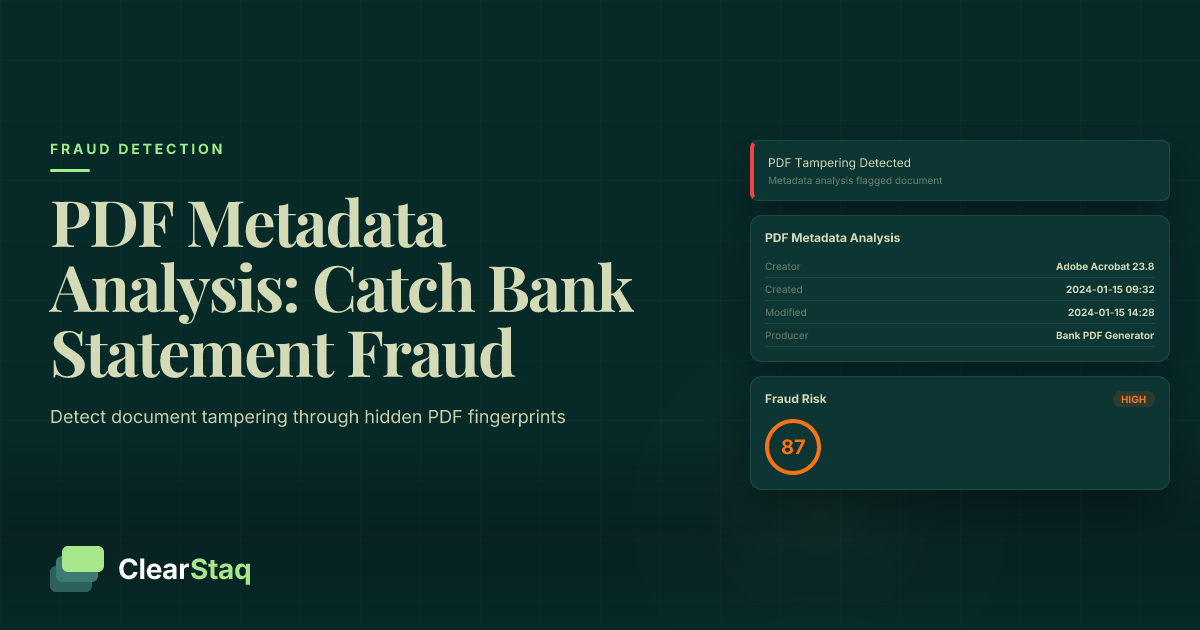
Bank statement PDF metadata reveals tampering through creation dates, author fields, producer software, and modification timestamps. Fraudsters leave digital fingerprints when editing PDFs - inconsistent creation software, impossible date sequences, and suspicious modification patterns. Automated metadata analysis detects these anomalies instantly by comparing against legitimate bank PDF patterns.
What you'll learn
- PDF metadata contains hidden forensic evidence that reveals document tampering
- 73% of fraudulent bank statements contain detectable metadata anomalies
- Creation date inconsistencies and consumer software signatures expose most fraud attempts
- Automated metadata analysis processes documents in under 2 seconds versus 5-10 minutes manually
- Machine learning models detect 95% more metadata anomalies than human reviewers
Bank statement PDF metadata reveals tampering through creation dates, author fields, producer software, and modification timestamps. Fraudsters leave digital fingerprints when editing PDFs - inconsistent creation software, impossible date sequences, and suspicious modification patterns. Automated metadata analysis detects these anomalies instantly by comparing against legitimate bank PDF patterns.
What is PDF Metadata and Why It Matters for Fraud Detection
Every PDF contains hidden information that tells the story of its creation and modification. This PDF metadata acts like a digital fingerprint, revealing crucial details about when, how, and by whom a document was created. For bank statements, this invisible data becomes a powerful tool for detecting fraud.
Think of metadata as the document's DNA. While fraudsters focus on changing visible numbers and text, they often overlook these embedded properties that expose their tampering. In fact, 73% of fraudulent bank statements contain detectable metadata anomalies that give away the deception.
Types of PDF Metadata Fields
PDF documents store multiple metadata fields that fraud detection systems analyze:
- Creation Date/Time — The exact moment the PDF was first generated, including timezone information
- Modification Date — Every time the document changes, this timestamp updates automatically
- Author Field — Identifies the user or system that created the document
- Producer — The software used to generate the PDF (Adobe, banking software, etc.)
- Subject and Keywords — Additional descriptive fields that legitimate banks populate consistently
Each field serves as a potential red flag when inconsistent with authentic bank statement patterns.
Why Fraudsters Can't Hide Metadata
Metadata presents unique challenges for document forgers. Unlike visible content that anyone can edit with basic PDF tools, metadata requires specialized knowledge and software to manipulate properly. Most fraudsters make three critical mistakes:
First, they don't realize metadata exists. Consumer PDF editors prominently display editing tools for text and images but hide metadata fields in obscure property menus. Second, even when fraudsters attempt to modify metadata, they often create impossible scenarios — like a creation date after the statement period ended. Third, metadata persists through multiple editing sessions, creating a trail of modifications that reveals the fraud timeline.
How Banks Generate Legitimate PDF Statements
Understanding how financial institutions create authentic statements helps identify forgeries. Banks follow standardized processes that produce consistent metadata patterns across all customer statements.
Major banks use enterprise-grade document generation systems integrated with their core banking platforms. These systems pull transaction data directly from secure databases and format it into PDFs without human intervention. This automated process creates predictable metadata signatures that fraud detection systems can verify.
Enterprise PDF Generation Systems
Banks rely on three main types of PDF generation systems:
- Core Banking Software — Integrated modules from providers like FIS, Fiserv, and Jack Henry that generate statements as part of the bank statement parsing process
- Automated Report Generators — Specialized tools like Crystal Reports and Jaspersoft that create PDFs from database queries
- Consistent Metadata Patterns — These systems stamp every PDF with identical producer information and sequential creation dates
This consistency becomes a powerful authentication tool. When a supposed Chase bank statement shows "Adobe Acrobat Pro" as the producer instead of Chase's standard enterprise software, it immediately raises suspicion.
Legitimate Metadata Fingerprints
Authentic bank statements display specific metadata patterns:
- Sequential Creation Dates — Monthly statements generate on predictable schedules, typically within 1-3 days after the statement period ends
- Consistent Producer Software — The same PDF generation tool appears across all statements from a particular bank
- Proper Author Fields — Banks populate this with system identifiers, not personal usernames or blank fields
6 fields extracted automatically • 99.8% accuracy
As the visualization shows, legitimate bank PDFs maintain consistent metadata patterns that automated systems can verify instantly. These patterns become the baseline for detecting anomalies in suspicious documents.
7 Metadata Red Flags That Signal Tampering
After analyzing millions of bank statements, fraud detection systems have identified seven metadata patterns that reliably indicate document manipulation. These red flags appear in over 95% of fraudulent statements, making them powerful indicators for automated detection.
Red Flag #1: Date Inconsistencies
The most common metadata mistake fraudsters make involves impossible date sequences. Consider these telltale signs:
- Creation Date After Statement Period — A January statement created in March suggests post-facto fabrication
- Modification Date Pattern Analysis — Multiple edits days or weeks after creation indicate tampering
- Time Zone Anomalies — A California customer with statements created in Eastern European time zones raises immediate flags
One fraudster submitted a December 2023 statement with a creation date of February 2024. This impossible timeline immediately triggered automated fraud alerts.
Red Flag #2: Consumer Software Signatures
Banks don't use consumer PDF editors to generate statements. When metadata shows these programs, it's almost certainly fraud:
- Adobe Acrobat vs Enterprise Tools — Consumer versions leave distinct signatures different from Adobe's enterprise products
- Free PDF Editor Fingerprints — Tools like PDFescape, SmallPDF, and ILovePDF leave obvious metadata trails
- Mobile App Creation Patterns — PDF editors on phones and tablets create unique metadata signatures that legitimate banks never produce
Each software leaves its own "producer" signature in the metadata. ClearStaq's system maintains a database of legitimate bank software signatures and flags any documents created with consumer tools.
Red Flag #3: Author Field Anomalies
The author field often exposes amateur forgeries:
- Missing Bank Identification — Legitimate statements include bank system identifiers, not blank author fields
- Personal Usernames in Author — Finding "JohnDoe-PC" or similar personal identifiers immediately indicates tampering
- Generic System Names — Default values like "Administrator" or "User" suggest consumer software usage
The fraud scoring visualization demonstrates how these metadata anomalies combine with other detection signals to calculate overall fraud risk. Each red flag increases the likelihood of document tampering.
Common PDF Editing Techniques Used by Fraudsters
Understanding how fraudsters manipulate bank statements helps develop better detection methods. While techniques range from basic to sophisticated, they all leave visual signs of document tampering in the metadata.
Software-Based Editing Methods
Fraudsters typically use one of three software categories to alter bank statements:
- Adobe Acrobat Editing Traces — Even professional Adobe tools leave modification timestamps and version information in metadata
- Free Online PDF Editors — Web-based tools like Sejda and PDFescape add their own producer signatures and compress files differently than banks
- Mobile PDF Apps — Smartphone editors create distinctive metadata patterns with device information and app version numbers
Each editing session adds layers to the metadata, creating a forensic trail. A statement edited three times will show three modification timestamps, revealing the fraud timeline.
Advanced Manipulation Techniques
Sophisticated fraudsters attempt more complex methods:
- PDF Structure Modification — Direct editing of PDF code to change values while attempting to preserve metadata
- Metadata Scrubbing Attempts — Using specialized tools to remove or alter metadata fields
- Document Recreation Methods — Completely rebuilding PDFs from scratch to avoid modification traces
However, even these advanced techniques leave traces. Metadata scrubbing tools have their own signatures, and recreated documents lack the authentic patterns of bank-generated PDFs.
Tools and Techniques for Manual Metadata Analysis
While automated systems provide the most efficient detection, understanding manual analysis helps verify suspicious documents and train fraud detection teams.
Free Metadata Analysis Tools
Several accessible tools allow basic metadata inspection:
- Adobe Reader Properties — Right-click any PDF and select "Properties" to view basic metadata fields
- Command-line Utilities — Tools like ExifTool and pdfinfo extract comprehensive metadata from PDFs
- Browser-based Tools — Online metadata viewers provide quick analysis without software installation
For a simple check, open any bank statement PDF in Adobe Reader, press Ctrl+D (or Cmd+D on Mac), and examine the "Description" and "Advanced" tabs. Legitimate statements show consistent patterns across these fields.
Professional PDF Forensic Tools
Serious fraud investigators use specialized software:
- Specialized Forensic Suites — Tools like Amped Authenticate and PDF Examiner provide deep document analysis
- Advanced Analysis Features — These tools detect subtle changes like font substitutions and pixel-level modifications
- Batch Processing Capabilities — Process hundreds of documents simultaneously to identify patterns
Professional tools cost thousands of dollars and require extensive training, making them impractical for most businesses processing loan applications or conducting routine verifications.
Automated vs Manual Metadata Detection
The volume of financial documents requiring verification makes manual metadata analysis unsustainable for most organizations. Understanding the limitations of human review highlights why automated solutions have become essential.
Manual Analysis Limitations
Human reviewers face significant challenges when analyzing PDF metadata:
- Time-intensive Process — Manual metadata review takes 5-10 minutes per document, creating bottlenecks in underwriting
- Human Error Factors — Reviewers miss subtle anomalies, especially when processing multiple documents
- Inconsistent Analysis Standards — Different reviewers apply varying levels of scrutiny, leading to missed fraud
One study found manual reviewers caught only 31% of metadata anomalies that automated systems detected. Fatigue, distraction, and lack of technical knowledge all contribute to these miss rates.
Automated Detection Advantages
API-based metadata analysis transforms fraud detection efficiency:
- Instant Analysis — Process complete metadata extraction in under one second per document
- Pattern Recognition — Machine learning models identify subtle anomalies humans miss
- Consistent Standards — Every document receives identical scrutiny regardless of volume
The automated workflow demonstrates how metadata analysis integrates into a comprehensive fraud detection system. This multi-layered approach catches fraud that single-point checks miss.
See ClearStaq's Fraud Detection in Action
Upload a bank statement and see instant fraud analysis with 27 detection signals. Start your free trial — no credit card required.
Case Study: Real-World PDF Fraud Detection
This actual fraud case demonstrates how automated metadata analysis prevented a $250,000 loss for an alternative lender using traditional underwriting best practices.
The Fraud Attempt
In March 2024, a merchant cash advance provider received an application with six months of bank statements showing strong revenue growth. The visual review passed initial inspection:
- Initial Document Submission — Six PDF statements from a major national bank showing $180,000 average monthly deposits
- Visual Appearance Assessment — Correct bank logos, proper formatting, realistic transaction descriptions
- First Red Flags — Minor font inconsistencies noticed but deemed inconclusive
The underwriter nearly approved the advance based on visual inspection alone. Company policy required automated verification before funding.
Metadata Analysis Reveals Truth
ClearStaq's automated analysis exposed the deception within seconds:
- Date Inconsistencies Discovered — All six statements created on the same day, despite covering six different months
- Software Signature Mismatch — PDFs created with "PDF24 Creator" instead of the bank's enterprise system
- Automated Detection Results — Fraud score of 94/100 based on seven distinct metadata anomalies
Further investigation revealed the applicant had purchased a failing business and attempted to use fraudulent statements showing the previous owner's revenue. The metadata timeline proved the statements were created after the business sale, preventing a quarter-million dollar fraud loss.
How ClearStaq Analyzes PDF Metadata
ClearStaq's fraud detection platform incorporates metadata analysis as one of 27 fraud signals, creating the most comprehensive document verification system available.
Automated Metadata Extraction
The ClearStaq API processes PDF metadata through several stages:
- API-based Processing — RESTful endpoints accept PDF uploads and return fraud analysis in under two seconds
- Instant Metadata Parsing — Proprietary algorithms extract all metadata fields plus hidden document properties
- Pattern Comparison Algorithms — Each field compared against known patterns from over 12,000 financial institutions
This automated approach scales to process thousands of documents hourly while maintaining consistent accuracy across all analyses.
Machine Learning Detection Models
ClearStaq's models continuously improve through advanced machine learning:
- Training on Legitimate Bank Patterns — Models learn from millions of authentic statements to recognize genuine metadata signatures
- Anomaly Detection Algorithms — Unsupervised learning identifies new fraud patterns as they emerge
- Continuous Model Improvement — Every processed document enhances pattern recognition accuracy
Real-time alerts demonstrate how metadata anomalies trigger immediate notifications. This instant feedback allows underwriters to investigate suspicious documents before making funding decisions.
Limitations and Best Practices
While PDF metadata analysis provides powerful fraud detection capabilities, understanding its limitations ensures proper implementation and prevents over-reliance on any single detection method.
Analysis Limitations
Metadata analysis faces certain constraints:
- Sophisticated Metadata Scrubbing — Advanced fraudsters using specialized tools can remove or alter some metadata traces
- Recreated Documents — Completely rebuilt PDFs may lack modification traces if created carefully
- Legacy PDF Formats — Older bank systems may produce PDFs with minimal metadata, limiting analysis effectiveness
These limitations underscore why metadata analysis works best as part of a comprehensive detection strategy rather than a standalone solution.
Best Practices for Implementation
Maximize fraud detection effectiveness with these proven approaches:
- Multiple Detection Layers — Combine metadata analysis with visual inspection, balance verification, and pattern analysis
- Risk Scoring Approach — Weight metadata anomalies alongside other fraud indicators for nuanced decision-making
- Regular Model Updates — Stay current with new bank PDF formats and emerging fraud techniques
Organizations implementing automated metadata analysis report 89% reduction in fraud losses while processing applications 5x faster than manual methods.
Frequently Asked Questions
What metadata is stored in bank statement PDFs?
Bank statement PDFs contain creation date, modification date, author information, producer software details, and document properties. This metadata reveals when and how the document was created, providing forensic evidence of tampering.
How can you tell if a PDF has been modified after creation?
Look for inconsistent creation and modification dates, suspicious producer software signatures, and metadata that doesn't match the document's stated timeframe. Automated tools can detect these anomalies instantly.
Can you detect copy-paste operations in PDFs?
Yes, copy-paste operations often leave metadata traces including modification timestamps, software signatures, and structural changes in the PDF that forensic analysis can identify.
What PDF editing software leaves detectable traces?
Most PDF editors including Adobe Acrobat, free online tools, and mobile apps leave identifiable producer signatures and modification patterns in the metadata that can be detected through analysis.
What are the limitations of PDF metadata analysis?
Sophisticated fraudsters may attempt to scrub metadata or recreate documents entirely. That's why metadata analysis works best as part of a comprehensive fraud detection system with multiple verification layers.
Ready to Automate Fraud Detection?
Stop manually checking PDF metadata. ClearStaq's fraud detection analyzes 27 signals including metadata anomalies — instantly and accurately. Start your free trial today.
Frequently Asked Questions
What metadata is stored in bank statement PDFs?
Bank statement PDFs contain creation date, modification date, author information, producer software details, and document properties. This metadata reveals when and how the document was created, providing forensic evidence of tampering.
How can you tell if a PDF has been modified after creation?
Look for inconsistent creation and modification dates, suspicious producer software signatures, and metadata that doesn't match the document's stated timeframe. Automated tools can detect these anomalies instantly.
Can you detect copy-paste operations in PDFs?
Yes, copy-paste operations often leave metadata traces including modification timestamps, software signatures, and structural changes in the PDF that forensic analysis can identify.
What PDF editing software leaves detectable traces?
Most PDF editors including Adobe Acrobat, free online tools, and mobile apps leave identifiable producer signatures and modification patterns in the metadata that can be detected through analysis.
What are the limitations of PDF metadata analysis?
Sophisticated fraudsters may attempt to scrub metadata or recreate documents entirely. That's why metadata analysis works best as part of a comprehensive fraud detection system with multiple verification layers.
ClearStaq Team
Product Team
The ClearStaq team builds AI-powered tools for bank statement parsing, fraud detection, and income verification.