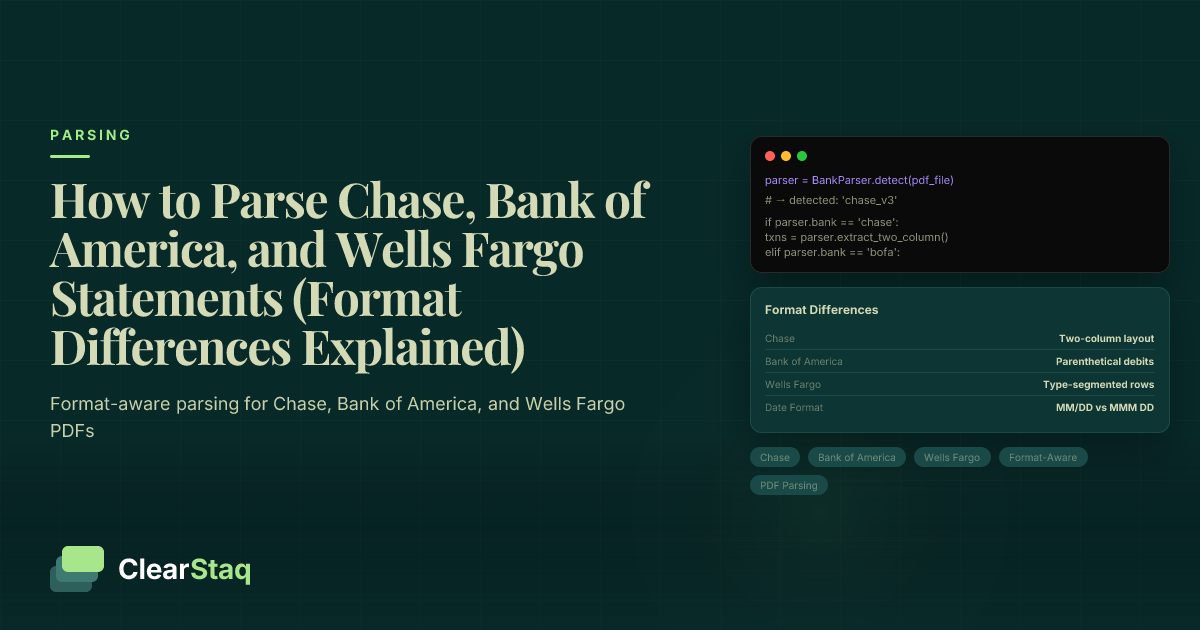
Chase, Bank of America, and Wells Fargo each use distinct PDF layouts, column structures, and transaction groupings that prevent any one-size-fits-all parsing approach. Chase uses a two-column transaction layout with continuation headers; Bank of America applies parenthetical debit notation; Wells Fargo segments transactions by type. Format-aware parsers handle all three by applying bank-specific extraction templates.
What you'll learn
- Chase, Bank of America, and Wells Fargo each use structurally different PDF layouts that require bank-specific parsing logic
- Chase business statements may render credits and debits in side-by-side columns that break standard line-by-line text extraction
- Bank of America uses parenthetical debit notation in certain account types, silently corrupting cash flow calculations if not normalized
- Wells Fargo groups transactions by type rather than chronological order, requiring sub-section merging before timeline reconstruction
- Format-aware parsers auto-detect bank and statement version, apply the correct extraction template, and return a normalized JSON schema regardless of source bank
Chase, Bank of America, and Wells Fargo each use distinct PDF layouts, column structures, and transaction groupings that prevent any one-size-fits-all parsing approach. Chase uses a two-column transaction layout with continuation headers; Bank of America applies parenthetical debit notation; Wells Fargo segments transactions by type. Format-aware parsers handle all three by applying bank-specific extraction templates.
Why Bank Statement Formats Are Not Universal
If you've ever tried to parse bank statements at scale, you've hit this wall: logic that works perfectly on one bank's PDF breaks completely on another. That's not a bug — it's the nature of how bank statements are designed.
No regulatory body dictates how a PDF bank statement must be structured. Each bank designs its own template, and those templates differ in column order, date formatting, debit notation, transaction grouping, and multi-page behavior. A naive line-by-line parser tuned for Chase will produce garbage on Wells Fargo output, and vice versa.
The stakes are real. Format failures cause misread balances, missed transactions, and downstream blind spots in fraud detection and underwriting. Getting the format right isn't an edge case — it's the foundation.
What "Parsing" Actually Means for a Bank Statement
Bank statement parsing is the process of extracting structured data — transaction date, description, amount, and running balance — from an unstructured PDF document. The output is machine-readable: a clean array of records that downstream systems can process.
Parsing operates in two modes. Native PDF text extraction reads the embedded text layer directly, which is fast and highly accurate when the text layer is clean. Image-based OCR handles scanned documents by converting pixels to text first, then extracting fields. Both modes must account for the bank's specific layout — because field positions shift between institutions and even between statement versions of the same bank.
The Three Formats That Dominate Lending and Accounting Workflows
Chase, Bank of America, and Wells Fargo collectively hold a dominant share of US business checking accounts. Any lender, CPA, or developer parsing statements at scale will encounter all three on a regular basis.
Each bank has also updated its PDF template at least once since 2022. Parsing logic built against older templates is frequently stale — even for institutions your team thinks it already handles. That's why format awareness isn't a one-time investment. It's an ongoing maintenance requirement.
Chase Bank Statement Format: Structure, Quirks, and Parsing Tips
Chase personal checking statements use a single unified transaction table with four columns: Date | Description | Amount | Balance. That structure is relatively straightforward to parse. Chase business checking is a different story.
Business statements sometimes render credits and debits in side-by-side columns rather than a single signed amount column. Column widths also vary between personal and business variants, so position-based extraction rules built for one won't reliably transfer to the other.
The statement period — your start and end dates — is embedded in a header block, not a clearly labeled field. Extracting it requires pattern matching against date strings, not a simple field lookup.
The Two-Column Layout Problem in Chase Business Statements
In some Chase business checking PDFs, credits and debits appear in separate side-by-side columns rather than a single amount column with positive and negative values. Standard left-to-right text extraction collapses both columns into a single row, producing garbled output.
The correct approach is to detect column boundaries by the X-coordinate of each text token before parsing rows. Once the parser knows where the credit column ends and the debit column begins, it can assign values to the right field — and reconstruct a proper signed amount for downstream use.
How Multi-Page Continuation Headers Trip Up Parsers
Every new page of a Chase statement repeats the table header row — "Date," "Description," "Amount," "Balance." A parser that treats all rows equally will attempt to interpret this header as a transaction record, producing an error or a corrupted row.
The fix is straightforward but requires explicit implementation: identify and skip rows where the date cell matches known header label strings before extracting data. Without this check, multi-month statements with many pages accumulate a surprising number of phantom "transactions."
Exporting Chase Statements: CSV, QFX, and PDF Options
Chase online banking offers CSV and QFX (Quicken) downloads under Statements & Documents. The CSV includes Date, Description, and Amount columns but omits the running balance — which matters if your workflow depends on per-transaction balance reconciliation.
QFX is OFX-wrapped and compatible with QuickBooks and Mint, but it requires format conversion for API pipelines. For a full breakdown of how these formats compare, see our guide to bank statement conversion formats like QFX, OFX, CSV, and JSON.
PDF remains the most common format for lender submissions. It's not interchangeable with CSV or QFX — the data completeness, layout, and verification value are different. Most underwriting workflows require the original PDF regardless of what machine-readable exports are available.
Bank of America Statement Format: What Makes It Different
Bank of America takes a fundamentally different structural approach. Rather than a single unified transaction list, BoA separates deposits and withdrawals into distinct sub-tables within the statement. That's the first thing any parser needs to account for.
The statement period is clearly labeled in the header block — more consistent and easier to detect than Chase's embedded date strings. That's one of the few areas where BoA is actually simpler to parse.
BoA business statements introduce another challenge: check images embedded as PDF objects. These add pages and file size without containing transaction data. A parser must identify and skip these image pages, or it wastes processing cycles and risks misinterpreting visual artifacts as text.
Parenthetical Debit Notation: A Silent Parser Killer
In certain BoA account types — particularly small business checking and some legacy personal account formats — debit amounts appear in parenthetical notation: (500.00) rather than -500.00.
A parser expecting a negative sign prefix for debits will misclassify these as positive amounts. That corrupts every downstream cash flow calculation. The error is silent — the parser doesn't throw an exception, it just produces wrong numbers.
The correct handling is to normalize parenthetical notation to negative floats during post-extraction processing. This step must be applied selectively based on detected account type and statement generation, not globally — because other sections of the same statement may use standard negative notation.
How Bank of America Handles Running Balances
BoA personal statements omit a per-transaction running balance column entirely. Only the opening and closing balances appear — typically as section footers rather than inline with each transaction row.
BoA business statements do include a balance column, but it resets at each sub-section boundary. The balance at the end of the deposits sub-table is not continuous with the balance at the start of the withdrawals sub-table. Running balance reconciliation must account for these section resets rather than treating the balance field as a single continuous column.
Downloading Bank of America Statements: Supported Formats
BoA offers OFX, QFX, CSV, and Microsoft Money (OFC) downloads from online banking. The CSV export includes Date, Description, Amount, and Running Balance — more complete than Chase's CSV offering.
That said, PDF statements remain the standard for verification workflows and lender submissions. The machine-readable downloads are useful for accounting imports, but they don't substitute for the PDF in regulatory or underwriting contexts.
Wells Fargo Statement Format: Layout Challenges and Data Fields
Wells Fargo groups transactions by type within the statement. Checks posted, ATM and debit card withdrawals, ACH and electronic payments, and wire transfers each appear in their own labeled sub-section. This structure is readable for humans reviewing a paper statement, but it breaks the chronological-order assumption that most parsers rely on.
Date format is MM/DD — the same as Chase — but description fields for ACH transactions can span two lines, causing misalignment in position-based extraction that doesn't account for line wrapping.
The statement period is clearly labeled, and account numbers appear masked to the last four digits in the header — a security measure that's consistent across personal and business formats.
Transaction Grouping by Type: Why Chronological Parsers Fail
A parser expecting all transactions in date order will extract ACH payments sorted separately from wire transfers, checks separately from deposits. The result is a timeline that's impossible to reconstruct without additional processing.
The correct approach is to parse each sub-section independently, tag each transaction with its category type (ACH, wire, check, deposit), and then merge and sort by date as a final step. Wells Fargo business statements have more sub-sections than personal statements — checks, deposits, withdrawals, wire in, wire out, and fees each get their own labeled block.
Understanding the distinctions between ACH vs wire vs check transaction types is essential context for why Wells Fargo chose this grouping structure and why preserving the category tag in parsed output matters for cash flow analysis.
Wire Transfer Sub-Section: Extra Fields and Parsing Implications
Wire transfers in Wells Fargo statements include fields that don't appear in other sub-sections: originator name and reference number, in addition to date and amount. A fixed-column parser built for the standard transaction row structure will error when it hits the wire transfer sub-section.
For lenders and underwriters, this matters significantly. Wire transfer amounts are often the largest individual transactions in a business statement — missing them or misreading them skews the entire cash flow analysis. The parser must handle variable column structures per sub-section, not assume a single schema applies throughout.
Downloading Wells Fargo Statements: What Formats Are Available
Wells Fargo supports QFX, OFX, CSV, and BAI2 downloads. BAI2 is a bank-specific format used by treasury management systems and is rarely relevant for standard parsing use cases.
The CSV download flattens all transactions into a single list — it does not preserve the sub-section grouping that appears in the PDF. That's useful for simplicity but loses the transaction type context that the PDF preserves. For workflows that need category-tagged transaction data, the PDF is the better source.
Side-by-Side Format Comparison: Chase vs. BoA vs. Wells Fargo
No competitor has published a technical comparison of these three bank formats at the structural level. The table below covers the dimensions that matter most for parsing implementation.
| Feature | Chase | Bank of America | Wells Fargo |
|---|---|---|---|
| Transaction layout | Single unified table (personal); two-column possible (business) | Separate deposits and withdrawals sub-tables | Sub-sections grouped by transaction type |
| Debit notation | Negative sign prefix (−) | Parenthetical in some formats — (500.00) | Negative sign prefix (−) |
| Running balance column | Per-transaction, continuous | Omitted in personal; resets per sub-section in business | Present but resets at each sub-section boundary |
| Transaction ordering | Chronological within unified table | Chronological within each sub-table | Grouped by type, not chronological across sections |
| Statement period location | Header block — pattern match required | Labeled "Statement Period" field — consistent | Sub-section header — "Account Activity from MM/DD to MM/DD" |
| Multi-page behavior | Repeating continuation headers on every page | Standard page breaks — no repeated headers | Sub-sections may span pages — section label not repeated |
| Business vs. personal differences | Two-column layout risk in business; multi-account PDFs possible | Check images embedded in business PDFs | More sub-sections in business; wire fields differ |
| Date format | MM/DD | MM/DD/YYYY | MM/DD |
Achieving high parsing accuracy across all three formats requires format-specific logic at every layer — not just OCR quality, but field detection, notation normalization, and section boundary recognition.
Password-Protected PDFs: How Each Bank Handles Security
Chase statements downloaded from online banking are typically not password-protected. Some e-delivery formats apply protection, but it's not the default behavior for most account types.
Bank of America PDF statements are sometimes password-protected using the last four digits of the account number or a user-set PIN. Wells Fargo business statements downloaded from Business Online Banking may include PDF encryption. Any parsing pipeline must attempt decryption before text extraction — a failure to handle this silently returns empty output with no error signal, which is the worst possible failure mode.
Statement Period Detection: Where Each Bank Hides the Dates
The statement period — start and end date — is essential for attributing transactions to the correct reporting window. Getting it wrong misattributes transactions across months.
Chase embeds the period in a header block formatted as "Month DD, YYYY through Month DD, YYYY." BoA provides the most consistent detection: a clearly labeled "Statement Period" field near the top of the document. Wells Fargo uses a sub-section header format: "Account Activity from MM/DD/YYYY to MM/DD/YYYY." Each requires a different detection pattern.
Business vs. Personal Statements: Format Differences That Matter
Business checking statements at all three banks include transaction sub-types that don't appear in personal statements: wire in and out, ACH credits and debits, merchant deposits, and fee itemization. Parsing logic designed for personal statements will miss these categories entirely.
This isn't a minor gap. For a lender evaluating a business applicant's cash flow, merchant deposit patterns, payroll ACH activity, and large wire transfers are the most important signals in the document. Missing them because the parser used personal statement logic is a material underwriting error.
Multi-Account PDFs: When One File Contains Multiple Statements
Chase business clients sometimes receive a combined statement PDF covering checking, savings, and credit accounts within a single file. There's no universal page marker that signals where one account ends and the next begins.
A parser must detect account section boundaries — typically by identifying account number changes or section header patterns within the document — and extract each account's transactions separately. Merging all transactions from a multi-account PDF without segmentation produces corrupted balance data, because opening and closing balances from different accounts get mixed into a single reconciliation.
Why Business Statement Parsing Matters for MCA Underwriters
Merchant cash advance underwriters rely exclusively on business checking statements — not personal accounts. These documents reveal the merchant deposit patterns, loan repayment activity, payroll ACH timing, and wire transfers that drive approval decisions and risk scoring.
Format errors in business statement parsing directly affect those decisions. A parser that misses a sub-section, misreads a debit notation, or fails to detect a wire transfer isn't just producing incomplete data — it's producing incorrect risk assessments. Our MCA underwriting checklist covers what underwriters need from parsed bank data and why format precision is non-negotiable in that context.
How Automated Parsers Handle Format Variability at Scale
The solution to format variability isn't a smarter generic parser. It's format-aware parsing: the parser identifies the bank and statement version first, then applies the correct extraction template for that specific format.
Bank identification happens automatically — using header text patterns, font signatures, or logo detection — without requiring the user to specify which bank the statement came from. Once the bank and format version are identified, the parser applies field mappings, notation rules, and section boundary logic specific to that template.
After extraction, running balance reconciliation verifies that each transaction's amount correctly moves the balance from opening to closing — catching extraction errors regardless of which format was parsed. This validation step is format-agnostic and catches problems that format-specific logic alone might miss.
Tired of Writing Custom Parsing Logic for Every Bank?
Upload a Chase, BoA, or Wells Fargo statement and see ClearStaq's format-aware engine return normalized JSON in seconds — no configuration required. Start your free trial today.
Format-Aware Fraud Detection: When the Format Is the Signal
A fraudulently altered bank statement often breaks the structural fingerprint of the bank it claims to be from. Column positions shift. Continuation headers are missing on multi-page documents. Fonts don't match the expected typeface for that institution. These are format-level anomalies that only a parser with deep format knowledge can detect.
Format-aware parsers can flag statements where the claimed bank doesn't match the detected structural template — a Chase statement that lacks continuation headers, or a BoA document where the sub-table structure is absent. This ties document forgery detection directly to parsing, not as a separate post-processing step but as a natural output of format-aware extraction.
This is a content gap that no competitor currently covers: the connection between format-specific structural knowledge and fraud signal generation.
Normalizing Output: One Data Schema Regardless of Source Bank
A well-designed parser returns the same JSON schema regardless of whether the input was a Chase, BoA, or Wells Fargo statement. Downstream systems — underwriting platforms, accounting software, fraud engines — receive consistent data without needing to know which bank generated the source document.
Normalized fields include: transaction_date, description, amount (signed float), type (debit/credit), category (for Wells Fargo sub-section tagging), running_balance, account_number (masked), statement_period_start, and statement_period_end. BoA parenthetical debits arrive as negative floats — not as strings with parentheses. Wells Fargo wire transfer reference numbers are preserved in an extended fields object.
ClearStaq's 900+ bank format support means this normalization extends beyond Chase, BoA, and Wells Fargo to regional banks, credit unions, and international institutions — all returning the same schema from the same API endpoint.
Automatic format detection
No configuration required • Just upload and go
Parsing These Statements with the ClearStaq API
ClearStaq's parsing engine includes pre-built format templates for Chase, Bank of America, and Wells Fargo — covering both personal and business statement variants. You don't specify a bank parameter in the request. The engine detects the bank and format automatically from the document itself.
Submit any of the three bank PDFs to a single endpoint and receive a normalized JSON response containing the full transactions array, account metadata, statement period, and opening and closing balances. Running balance reconciliation runs automatically — discrepancies between extracted transactions and the reported closing balance are flagged in the response with a reconciliation status field.
Fraud detection signals are applied post-parse using format-specific expectations. A Chase statement that doesn't match the known Chase structural fingerprint triggers a format anomaly flag — separate from and in addition to transaction-level fraud signals.
What the API Response Looks Like for Each Bank
The response structure is consistent regardless of source bank. At the top level: bank_name, account_number (masked to last four digits), statement_period_start, statement_period_end, opening_balance, closing_balance, and a transactions array.
Each transaction object contains: date, description, amount (signed float — BoA parenthetical debits are normalized here), type (debit or credit), category (populated from Wells Fargo sub-section labels), and running_balance. For Wells Fargo wire transfers, an extended_fields object preserves the originator name and reference number that don't appear in standard transaction rows.
Handling Password-Protected PDFs via the API
Pass an optional password parameter in the API request. ClearStaq attempts decryption before extraction — supporting both user-password and owner-password protected PDFs. If no password is provided and the PDF is encrypted, the API returns a clear error code rather than an empty response. Silent failures are the most costly outcome in a parsing pipeline — ClearStaq doesn't produce them.
One Integration, 900+ Banks Beyond Chase, BoA, and Wells Fargo
The same API endpoint handles regional banks, credit unions, and international institutions. Developers write the integration once — no conditional logic needed per bank format, no separate endpoints to maintain, no format detection code to build. For full implementation guidance, see our guide to converting PDF bank statements to structured JSON.
If you're evaluating whether to use PDF parsing or a direct bank connection, see our analysis of why lenders prefer PDF parsing over open banking connections — particularly for underwriting and verification workflows where the original document matters.
ClearStaq's bank statement parsing platform handles format detection, extraction, normalization, reconciliation, and fraud flagging in a single API call — across Chase, BoA, Wells Fargo, and hundreds of other institutions.
Frequently Asked Questions
How do I extract data from a Chase bank statement?
Chase bank statements can be parsed programmatically using a format-aware PDF extraction tool that handles Chase's specific column layout, continuation headers, and optional two-column business format. Alternatively, Chase's online banking portal allows CSV and QFX downloads, though these omit running balances and aren't suitable for lender verification workflows.
What format are Bank of America statements in?
Bank of America PDF statements separate deposits and withdrawals into distinct sub-tables and may use parenthetical notation — e.g., (500.00) — for debit amounts in certain account types. BoA also offers OFX, QFX, and CSV downloads, but PDF remains the standard format for underwriting and compliance submissions.
Can you parse a Wells Fargo PDF statement automatically?
Yes, but Wells Fargo statements require a parser that understands transaction sub-section grouping — checks, ACH, wire transfers, and deposits each appear in separate labeled sections rather than a single chronological list. An automated parser must merge these sub-sections and sort by date to produce usable output.
Why is my bank statement PDF not parsing correctly?
Common causes include a password-protected PDF that wasn't decrypted before extraction, a scanned image-based statement being processed by a text-only parser, or a business statement format being parsed with personal statement logic. Format-aware parsers that detect the bank and statement variant automatically resolve most of these failures.
Do all banks use the same PDF format for bank statements?
No. There is no regulatory standard for bank statement PDF layout. Chase, Bank of America, and Wells Fargo each use different column structures, debit notations, transaction ordering conventions, and multi-page behaviors. This is why bank-specific format templates — rather than generic parsing rules — are necessary for reliable data extraction at scale.
Chase, Bank of America, Wells Fargo, and 900+ Other Formats — One API Handles Them All
Start your free trial and parse your first statement in under 60 seconds. No configuration required, no bank parameter needed — ClearStaq detects the format and returns normalized JSON automatically.
Frequently Asked Questions
How do I extract data from a Chase bank statement?
Chase bank statements can be parsed programmatically using a format-aware PDF extraction tool that handles Chase's specific column layout, continuation headers, and optional two-column business format. Alternatively, Chase's online banking portal allows CSV and QFX downloads, though these omit running balances and are not suitable for lender verification workflows.
What format are Bank of America statements in?
Bank of America PDF statements separate deposits and withdrawals into distinct sub-tables and may use parenthetical notation — e.g., (500.00) — for debit amounts in certain account types. BoA also offers OFX, QFX, and CSV downloads, but PDF remains the standard format for underwriting and compliance submissions.
Can you parse a Wells Fargo PDF statement automatically?
Yes, but Wells Fargo statements require a parser that understands transaction sub-section grouping — checks, ACH, wire transfers, and deposits each appear in separate labeled sections rather than a single chronological list. An automated parser must merge these sub-sections and sort by date to produce usable output.
Why is my bank statement PDF not parsing correctly?
Common causes include a password-protected PDF that was not decrypted before extraction, a scanned image-based statement being processed by a text-only parser, or a business statement format being parsed with personal statement logic. Format-aware parsers that detect the bank and statement variant automatically resolve most of these failures.
Do all banks use the same PDF format for bank statements?
No. There is no regulatory standard for bank statement PDF layout. Chase, Bank of America, and Wells Fargo each use different column structures, debit notations, transaction ordering conventions, and multi-page behaviors. This is why bank-specific format templates — rather than generic parsing rules — are necessary for reliable data extraction at scale.
ClearStaq Team
Product Team
The ClearStaq team builds AI-powered tools for bank statement parsing, fraud detection, and income verification.