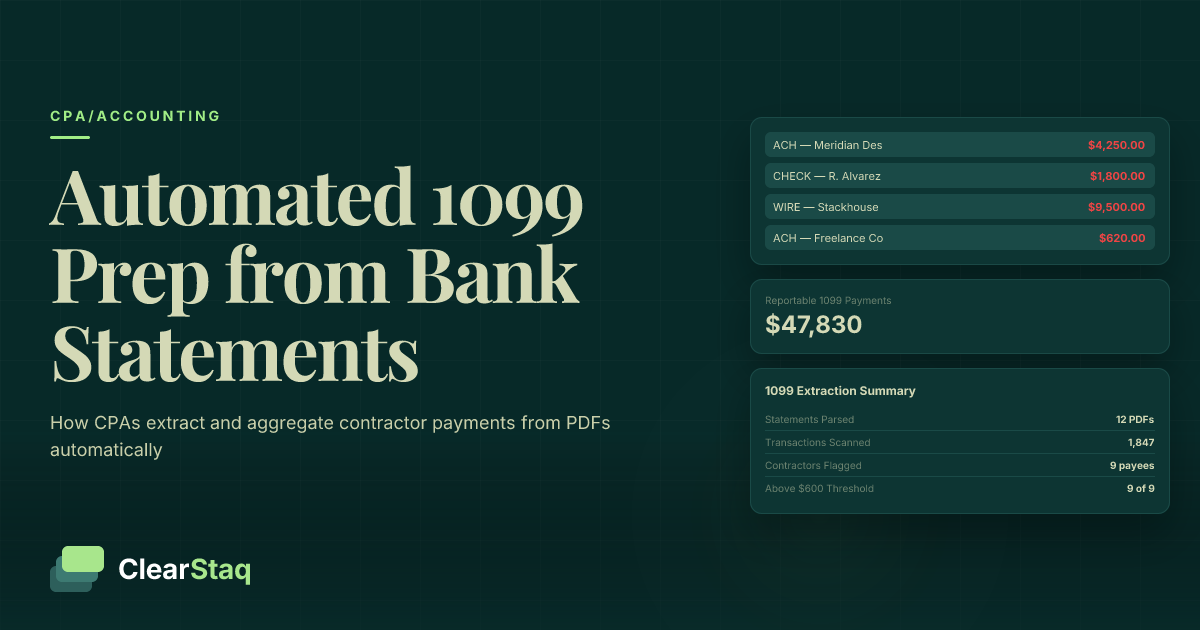
1099 bank statement extraction works by parsing raw PDF bank statements to pull every transaction record — payee name, amount, date, and payment type — then filtering for reportable contractor payments (ACH, wire, check) above the $600 IRS threshold. Automated tools like ClearStaq complete this process across a full year of statements in minutes, replacing hours of manual review.
What you'll learn
- Bank statements are often the only authoritative source capturing all contractor payments, regardless of what accounting software has recorded
- The IRS $600 threshold applies to annual aggregated payments per contractor, meaning month-by-month manual review frequently misses reportable payees
- Automated extraction classifies each transaction by payment method and payee type, filtering out credit card and third-party network payments that are not 1099-NEC reportable
- CPA firms using bank statement automation can process 60–80 clients per staff member in the four-week January window, versus 12–25 clients with manual review
- Bank statements alone cannot confirm LLC tax classification or provide contractor TINs — W-9 reconciliation remains a required manual step alongside automated extraction
1099 bank statement extraction works by parsing raw PDF bank statements to pull every transaction record — payee name, amount, date, and payment type — then filtering for reportable contractor payments (ACH, wire, check) above the $600 IRS threshold. Automated tools like ClearStaq complete this process across a full year of statements in minutes, replacing hours of manual review.
Why 1099 Prep Is a Bank Statement Problem
Most businesses don't have a clean, complete record of contractor payments sitting in their accounting software. QuickBooks may be missing transactions. Xero might not have every ACH payment categorized correctly. The one place where every outgoing payment actually exists — regardless of how it was recorded elsewhere — is the bank statement.
That's the core problem CPAs face every January. To prepare 1099s accurately, you need a complete picture of every payment made to every contractor across a full calendar year. Bank statements are often the only authoritative source that captures all of it.
Where Contractor Payment Data Actually Lives
A typical business client has 12 months of PDF bank statements per account — and may have multiple accounts. Operating accounts, payroll accounts, and money market accounts can all contain contractor payments. No single accounting system automatically captures and categorizes all of these correctly.
That leaves someone — usually a staff accountant or the CPA directly — with the job of matching every relevant statement line to a contractor name. For one client, that's manageable. For a firm handling dozens of clients in a four-week window, it's a different problem entirely.
The Scale Problem for CPA Firms
A CPA firm with 50 business clients may be looking at 600 or more individual monthly bank statements by the time 1099 season arrives. Each client may have multiple bank accounts. Each account may contain payments to multiple contractors spread across 12 separate PDFs.
CPAs who are already processing hundreds of bank statements during tax season know that manual review is directly proportional to volume. Every new client adds hours. Automation breaks that relationship — more clients don't mean proportionally more work.
What Counts as a Reportable Contractor Payment?
Before you can extract the right data, you need to know exactly what you're looking for. The IRS requires a Form 1099-NEC for any payment of $600 or more made to a non-employee individual or unincorporated business in a tax year. But not every outgoing payment in a bank statement meets that definition.
The payment method matters. The recipient entity type matters. And the $600 threshold applies to the aggregate of all payments over 12 months — not any single transaction. Understanding these rules is what separates a clean 1099 extraction from one that creates compliance exposure.
Payment Types That Show Up in Bank Statements (and Whether They're Reportable)
Here's how common bank statement transaction types map to 1099-NEC reporting requirements:
| Transaction Type | Appears in Bank Statement? | 1099-NEC Reportable? | Notes |
|---|---|---|---|
| ACH debit (to individual or unincorporated entity) | Yes | Yes | Payee name usually in description field |
| Wire transfer | Yes | Yes | Typically includes full payee info |
| Check payment | Yes | Yes | May appear as check number only — requires payee matching |
| Bill pay transaction | Yes | Depends on recipient type | Incorporated vendors are excluded |
| Credit card payment (to card network) | Yes | No | Network handles 1099-K; exclude from extraction |
| PayPal / Venmo / Square settlement | Yes (as lump sum) | No | Payment network reports; underlying payee not identifiable from statement |
For a deeper look at how ACH, wire, and check transaction types appear in business bank data, that breakdown covers the structural differences between each payment method.
The $600 Threshold Across 12 Months of Statements
The $600 threshold isn't per transaction — it's per contractor per year. A contractor paid $150 per month accumulates $1,800 by December, well above the reporting threshold. But if you're reviewing statements one month at a time, that contractor never crosses the threshold in any single file.
This is exactly why month-by-month manual review misses threshold breaches. Payments must be aggregated across all 12 monthly statements, all accounts, and all payment methods to calculate the true annual total for each contractor. It's also why automation isn't just faster — it's more accurate.
The Manual Approach: Why Reviewing Bank Statements by Hand Doesn't Scale
The manual 1099 prep process from bank statements is tedious and error-prone. Download the PDFs, open each month one at a time, scan the transaction list, tag what looks like contractor payments, build a spreadsheet, and repeat across 12 months. For one client with one bank account, expect 2-4 hours of staff time.
That time estimate compounds quickly. At 50 clients, manual 1099 prep from bank statements means 100 to 200 hours of staff time concentrated in the first four weeks of January — when every other deadline is also pressing.
Common Errors in Manual Bank Statement 1099 Review
Beyond the time cost, manual review introduces a predictable set of errors:
- Counting credit card processor payments as contractor payments — a business that pays contractors via credit card will see the transaction clear as a card network payment in the bank statement, not as a payment to the contractor
- Missing threshold breaches — contractors paid small amounts across many months are easy to overlook when reviewing files individually
- Double-counting across accounts — a payment recorded in both business checking and payroll registers can appear to be two separate transactions
- Misidentifying incorporated vendors as contractors — "LLC" in a business name doesn't automatically mean the payment is reportable; entity tax classification determines reporting obligation
What Manual Review Costs in Real Time
The direct cost is staff hours. The indirect cost is error correction: re-filing amended 1099s, managing IRS notices, and the penalty exposure from missed or incorrect filings. The IRS penalty for failing to file a correct 1099 ranges from $60 to $310 per form, depending on how late the correction is made.
There's also an opportunity cost. Every hour a staff accountant spends reviewing bank statement PDFs for contractor payments is an hour not spent on advisory work, tax planning, or client communication. Understanding the hidden cost of manual bank statement review makes the case for automation clearer than any hourly rate calculation.
How Automated Bank Statement Extraction Works for 1099 Prep
Automated 1099 bank statement extraction replaces the manual scan-and-tag process with a structured pipeline. Raw PDF bank statements go in; clean, filterable transaction data comes out. Here's what that pipeline actually does at each stage.
Step 1: Ingest — Raw PDF bank statements are uploaded via drag-and-drop, batch upload, or API call. No reformatting or template configuration required.
Step 2: Parse — OCR and structured parsing extract every transaction line from the PDF, capturing date, description, amount, transaction type, and running balance.
Step 3: Classify — AI evaluates each transaction to determine payee type: contractor, vendor, payroll, credit card payment, or internal transfer. Transactions with uncertain classification are flagged for human review.
Step 4: Aggregate — The system groups transactions by payee across all uploaded months and accounts, calculating the annual total for each contractor.
Step 5: Filter and export — The output is filtered to show only reportable contractor payments above the $600 threshold, then exported as structured JSON or CSV for import into accounting software or tax filing tools.
This approach also pairs well with automated expense categorization, which applies the same transaction-level classification logic to broader bookkeeping workflows.
What Data Fields Are Extracted for Each Transaction
Each transaction record in the extraction output includes the fields needed to populate Form 1099-NEC:
- Transaction date — confirms the payment falls within the reporting tax year
- Payee name / description — as it appears on the bank statement; may require W-9 reconciliation for legal name
- Transaction amount — the payment value used in annual aggregation
- Transaction type — ACH, wire, check, or card; determines reportability
- Running balance — used as a validation check during reconciliation
How AI Classifies Contractor vs. Non-Contractor Payments
The AI classification layer looks at multiple signals to determine whether a transaction is a reportable contractor payment:
- Payment method flag — ACH, wire, and check transactions are candidates; card-settled transactions are immediately excluded
- Payee pattern recognition — recurring payments to the same individual or entity suggest a contractor relationship
- Amount pattern analysis — irregular amounts (unlike round, consistent payroll-style amounts) are consistent with contractor billing
- Entity type indicators — descriptors like "Inc.", "Corp.", or "LLC" in the payee name trigger additional scrutiny and are surfaced for CPA review
Transactions where the classification is uncertain are surfaced in a review queue rather than silently assigned — which is exactly the behavior you want when the output feeds into IRS filings.
Step-by-Step: Extracting Contractor Payments with ClearStaq
Here's the concrete workflow a CPA firm uses to extract contractor payments from bank statements using ClearStaq — from raw PDF upload to 1099-ready export.
Step 1: Upload Bank Statements (Batch or API)
Upload all 12 monthly bank statements per client in a single batch using the ClearStaq dashboard. Drag and drop all PDFs at once — no preparation or template setup required. ClearStaq supports 900+ bank and credit union statement formats, so regardless of which bank your client uses, the parser handles it without manual configuration.
For firms processing large client volumes, the API endpoint accepts POST requests with statement PDFs and returns structured extraction results programmatically, making it easy to integrate into existing client intake workflows.
Step 2: Review Extracted Transactions and Apply 1099 Filters
Once extraction is complete, the transaction table displays all outgoing payments with date, payee name, amount, and transaction type. From there, apply filters to isolate the data relevant to 1099 prep:
- Filter by transaction type (ACH, wire, check) to exclude card payments and third-party network transactions
- Group by payee to see the running annual total for each contractor across all 12 months
- Apply the $600 threshold filter to surface only payees who require a 1099-NEC
- Review flagged transactions where classification is uncertain before finalizing the export
Step 3: Export Structured Data for 1099 Filing
Export the filtered contractor payment data as CSV for direct import into QuickBooks, Drake Tax, ProConnect, UltraTax, or Tax1099.com. The CSV output maps directly to the fields needed to complete Form 1099-NEC: payee name, total nonemployee compensation, and payment type confirmation.
JSON output is also available via API for firms building programmatic 1099 pipelines. For QuickBooks users specifically, the process to import extracted data into QuickBooks walks through the exact field mapping and import steps.
See ClearStaq's 1099 Extraction Workflow in Action
See how ClearStaq extracts and aggregates contractor payments from a full year of bank statements. Book a demo to walk through the 1099 prep workflow with your own client data.
Handling Edge Cases: LLCs, Credit Card Exclusions, and Mixed Payments
Bank statement extraction handles the data layer of 1099 prep reliably. But there are edge cases where the bank statement alone can't provide a definitive answer — and knowing how to handle them prevents downstream compliance errors.
What Bank Statements Can't Tell You (And What to Do About It)
LLC tax classification is the most common ambiguity. A single-member LLC (a disregarded entity) is reportable on a 1099-NEC. An LLC that has elected S-corp or C-corp treatment is excluded. The bank statement shows the payment but not the tax classification. A W-9 from the contractor is the only reliable way to confirm reportability for LLC payees.
Credit card payments create a specific identification problem. When a business pays a contractor using a credit card, the charge appears in the bank statement as a payment to the card network — not to the contractor. The extraction output will flag this as a card-settled transaction and exclude it from the contractor payment total automatically. The network handles the 1099-K for that transaction.
Third-party network payments (PayPal, Venmo, Square) appear in bank statements as lump-sum settlements or individual transfers — but the underlying payee can't be reliably identified from the statement data alone. These require the CPA to separately request 1099-K data from the payment processor.
Merchant descriptor mismatches are common: the payee description in a bank statement may read "J. Smith Consulting" in one month and "John Smith" in another. Payee normalization in the extraction output handles minor variations, but unusual discrepancies should be resolved against W-9 records.
For context on IRS-compliant classification of business expenses — including the distinction between contractor payments and other deductible expense types — see the guide on categorizing business expenses from bank statements.
Year-Over-Year Aggregation Across Multiple Statements
Each monthly bank statement is a separate PDF file. The aggregation challenge — combining 12 files per account across potentially multiple accounts into a single payee-level annual total — is where manual processes most frequently fail.
ClearStaq batch processing combines all uploaded monthly statements into a single transaction dataset before aggregation runs. Payee normalization handles name variations across months. Multi-account support merges transactions from business checking, payroll, and money market accounts into a unified payee view, so a contractor paid from two different accounts in the same year shows a single combined total — not two separate, potentially sub-threshold totals that both get missed.
Integrating Extracted Data into Your 1099 Workflow
Extracted contractor payment data is an input to 1099 preparation, not the finished output. It replaces the manual spreadsheet CPAs currently build from memory, email threads, and PDF annotation — and it feeds directly into the tax software where 1099s are actually completed and filed.
Mapping Extracted Fields to 1099-NEC Form Requirements
Here's how the extraction output fields map to the fields required on Form 1099-NEC:
| Form 1099-NEC Field | Source | From Extraction? |
|---|---|---|
| Box 1 — Nonemployee compensation | Sum of all reportable payments per contractor | Yes |
| Payee name | Extraction output + W-9 legal name reconciliation | Partial (W-9 required for legal name) |
| Payee TIN | W-9 records on file | No — not in bank statements |
| Payer information | CPA's client records | No |
| Payment method verification | Transaction type field in extraction output | Yes |
CSV export from ClearStaq maps directly to the import format expected by QuickBooks, Drake Tax, UltraTax, ProConnect, Tax1099.com, and Track1099. In most cases, no reformatting of the exported file is required before import.
API-Based 1099 Workflows for High-Volume CPA Firms
For firms processing 1099s at volume, an API-based workflow eliminates the manual export/import step entirely. The pipeline looks like this:
- POST bank statement PDFs to the ClearStaq API for each client
- Receive structured JSON responses with all extracted transaction records
- Programmatically filter for ACH, wire, and check payments; aggregate by payee across months and accounts
- Pipe aggregated contractor totals directly into a tax filing platform API (such as Tax1099.com's API)
- 1099-NECs are generated and e-filed without a single manual data entry step
For the technical implementation details, the guide on structured JSON bank statement data covers the API schema, endpoint structure, and response format in full.
How CPAs Use Automation to Handle 1099 Season Across Multiple Clients
The January 31 deadline compresses an enormous amount of work into four weeks. Every client needs a year's worth of contractor payments identified, verified, and filed. Without automation, that workload scales linearly with client count. With automation, it doesn't.
Tax season automation makes the CPA's workload sublinear: processing 100 clients doesn't take anywhere near 100x the time of processing 1 client. The extraction and aggregation steps — which account for the majority of manual hours — run in the background. The CPA's attention is reserved for exception handling, W-9 reconciliation, and final review before filing.
A CPA Firm's 1099 Season Workflow with Bank Statement Automation
Here's how a CPA firm using ClearStaq structures the four weeks between January 1 and the January 31 filing deadline:
- Week 1 (early January) — Batch upload all client bank statements received to date; extraction runs automatically across all files
- Week 1–2 — Review extraction outputs per client; flag uncertain payee classifications for follow-up
- Week 2–3 — Cross-reference flagged payees against W-9 records on file; confirm LLC classifications; resolve payee name discrepancies
- Week 3–4 — Export finalized contractor payment totals to tax software; complete and e-file Form 1099-NEC for each client
- January 31 — All 1099s filed with the IRS and copies sent to contractors
Extraction outputs also give CPAs a concrete "who needs a 1099" list to share with clients early in the process — prompting W-9 follow-up while there's still time to collect missing information before the deadline.
Capacity Planning: How Many Clients Can One Staff Member Handle?
The efficiency difference between manual and automated 1099 prep is significant:
| Approach | Time per Client | Clients per Staff Member (4-week window) |
|---|---|---|
| Manual bank statement review | 2–4 hours | 12–25 clients |
| Automated extraction + review | 20–30 minutes | 60–80+ clients |
That's a 3-4x capacity multiplier without adding headcount. Junior staff and paraprofessionals can handle the upload, extraction review, and exception flagging steps. CPAs focus on classification decisions, W-9 reconciliation, and filing sign-off. The full case for why firms choose to automate bank statement processing goes well beyond 1099 season — but 1099 prep is typically where the ROI becomes impossible to ignore.
For a broader look at tax season automation and how it changes CPA firm capacity planning across all January deadlines, that resource covers the full workflow picture.
Frequently Asked Questions
How do I prepare 1099s from bank statements?
Extract all outgoing transactions from the year's bank statements, then filter for ACH, wire, and check payments to non-employee individuals or unincorporated businesses totaling $600 or more. Automated tools like ClearStaq parse PDF bank statements and aggregate contractor payments by payee across all 12 months, replacing the manual spreadsheet process entirely.
What payments require a 1099-NEC?
Payments of $600 or more made by check, ACH, or wire transfer to individual contractors, sole proprietors, or LLCs not taxed as corporations require a 1099-NEC. Payments made by credit card, PayPal, Venmo, or Square are excluded — those are reported by the payment network, not the payer.
What transactions are excluded from 1099 reporting?
Credit card payments, PayPal and other third-party network transactions, and payments to incorporated entities (C-corps and S-corps) are excluded from 1099-NEC reporting. In bank statements, credit card payments appear as charges to the card network rather than to the contractor directly, and should be filtered out during extraction.
How do CPAs automate 1099 preparation?
CPAs automate 1099 prep by using bank statement extraction tools to parse PDF statements in batch, automatically classify outgoing payments by type and payee, and aggregate annual contractor totals. The structured output exports directly into tax software like QuickBooks, Drake, or Tax1099.com, eliminating manual data entry at every step.
Do I have to issue a 1099 to an LLC?
It depends on the LLC's tax classification. Single-member LLCs and LLCs taxed as partnerships are generally reportable on a 1099-NEC if payments meet the $600 threshold. LLCs that have elected S-corp or C-corp tax treatment are excluded. A W-9 from the contractor is the reliable way to confirm the correct classification — bank statements alone can't make this determination.
What is the threshold for issuing a 1099 to a contractor?
The IRS requires a 1099-NEC for any contractor paid $600 or more in a calendar year. This threshold applies to the aggregate of all payments across all payment methods (excluding credit cards and third-party networks), so multiple smaller payments throughout the year must be totaled across all monthly statements to determine the reporting obligation.
Ready to Automate Your 1099 Prep?
Stop rebuilding contractor payment spreadsheets from PDF bank statements every January. ClearStaq automates the extraction, aggregation, and export — so your team spends time on filings, not data entry. Book a demo to see the full 1099 workflow with your own client data.
Frequently Asked Questions
How do I prepare 1099s from bank statements?
Extract all outgoing transactions from the year's bank statements, then filter for ACH, wire, and check payments to non-employee individuals or unincorporated businesses totaling $600 or more. Automated tools like ClearStaq parse PDF bank statements and aggregate contractor payments by payee across all 12 months, replacing the manual spreadsheet process entirely.
What payments require a 1099-NEC?
Payments of $600 or more made by check, ACH, or wire transfer to individual contractors, sole proprietors, or LLCs not taxed as corporations require a 1099-NEC. Payments made by credit card, PayPal, Venmo, or Square are excluded — those are reported by the payment network, not the payer.
What transactions are excluded from 1099 reporting?
Credit card payments, PayPal and other third-party network transactions, and payments to incorporated entities (C-corps and S-corps) are excluded from 1099-NEC reporting. In bank statements, credit card payments appear as charges to the card network rather than to the contractor directly, and should be filtered out during extraction.
How do CPAs automate 1099 preparation?
CPAs automate 1099 prep by using bank statement extraction tools to parse PDF statements in batch, automatically classify outgoing payments by type and payee, and aggregate annual contractor totals. The structured output exports directly into tax software like QuickBooks, Drake, or Tax1099.com, eliminating manual data entry at every step.
Do I have to issue a 1099 to an LLC?
It depends on the LLC's tax classification. Single-member LLCs and LLCs taxed as partnerships are generally reportable on a 1099-NEC if payments meet the $600 threshold. LLCs that have elected S-corp or C-corp tax treatment are excluded. A W-9 from the contractor is the reliable way to confirm the correct classification — bank statements alone cannot make this determination.
What is the threshold for issuing a 1099 to a contractor?
The IRS requires a 1099-NEC for any contractor paid $600 or more in a calendar year. This threshold applies to the aggregate of all payments across all payment methods (excluding credit cards and third-party networks), so multiple smaller payments throughout the year must be totaled across all monthly statements to determine the reporting obligation.
ClearStaq Team
Product Team
The ClearStaq team builds AI-powered tools for bank statement parsing, fraud detection, and income verification.