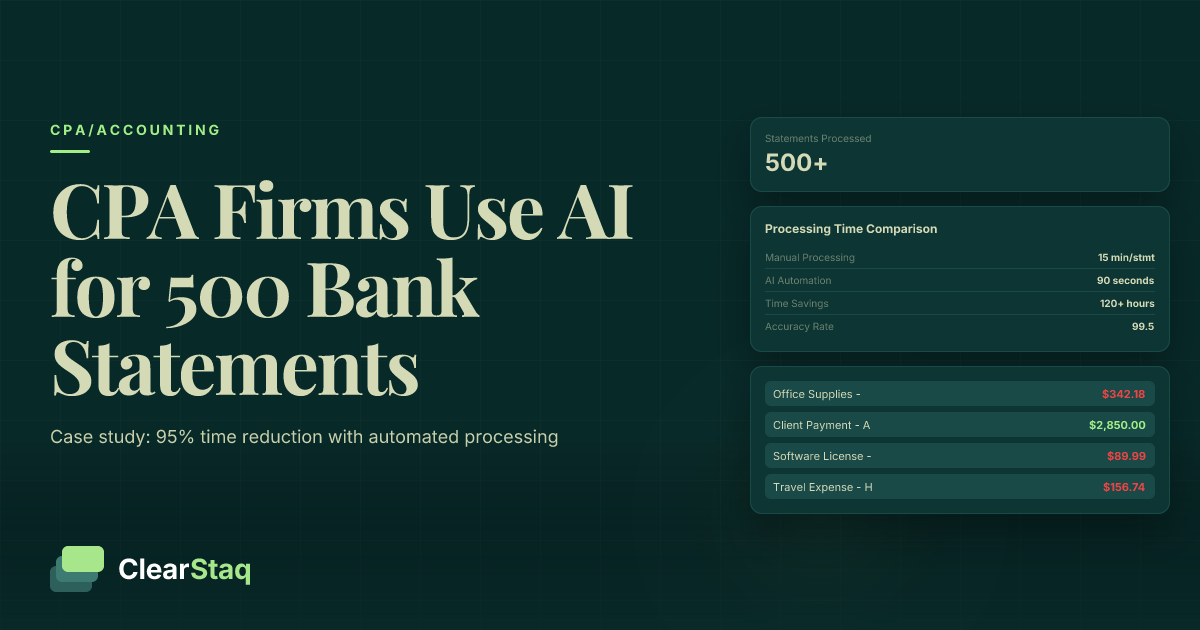
CPA firms are using AI bank statement automation to process 500+ statements during tax season in hours instead of weeks. Johnson & Associates reduced processing time from 15 minutes per statement to 90 seconds, saving 120+ hours per busy season while maintaining 99.5% accuracy through automated parsing and expense categorization.
What you'll learn
- CPA firms process 500+ bank statements during tax season, taking 125+ hours manually versus 12.5 hours with AI automation
- Johnson & Associates achieved 95% time reduction per statement, from 15 minutes to 90 seconds with automated processing
- AI bank statement automation maintains 99.5% accuracy compared to 85% accuracy rates during manual busy season processing
- Mid-size CPA firms save $15,000+ per tax season in labor costs while redirecting 120+ hours to advisory services
- Modern automation integrates with Drake, Lacerte, ProSeries and other tax software through API connections
CPA firms are using AI bank statement automation to process 500+ statements during tax season in hours instead of weeks. Johnson & Associates reduced processing time from 15 minutes per statement to 90 seconds, saving 120+ hours per busy season while maintaining 99.5% accuracy through automated parsing and expense categorization.
The Tax Season Bank Statement Challenge for CPA Firms
Tax season brings a perfect storm of challenges for CPA firms: client volume surges 3-5x, deadlines compress into a six-week window, and bank statement processing becomes the bottleneck that determines whether firms sink or swim. The math is brutal: a mid-size firm handling 300 business clients typically processes 500+ bank statements during peak season, with each statement requiring 10-15 minutes of manual review.
This volume surge hits firms when they can least afford inefficiency. Staff work 60+ hour weeks, error rates climb due to fatigue, and the opportunity cost of senior CPAs performing data entry reaches thousands of dollars per week. Many firms resort to hiring temporary staff or turning away new clients simply because they lack the capacity to process documents manually.
The hidden costs of manual review extend beyond labor hours. Transcription errors during busy season can trigger amended returns, client complaints, and professional liability exposure that far exceeds the cost of automation technology.
Manual Processing Time Breakdown
Understanding where time goes in manual bank statement processing reveals the automation opportunity:
- Download and organize: 2-3 minutes per statement finding, downloading, and filing PDFs from client portals or email attachments
- Data extraction: 8-12 minutes manually typing transaction data into spreadsheets or tax software
- Quality review: 2-3 minutes checking calculations, verifying balances, and categorizing expenses
For a typical business client with 12 monthly statements, this totals 3+ hours of manual work—time that could be spent on tax planning or advisory services that command premium rates.
The Cost of Manual Bank Statement Review
The financial impact of manual processing compounds during tax season. A senior staff accountant earning $35/hour spends 125 hours processing 500 bank statements manually, costing the firm $4,375 in direct labor. Factor in benefits, overhead, and the opportunity cost of billable advisory work at $150/hour, and the true cost approaches $15,000+ per tax season.
Client satisfaction suffers as well. Delays in bank statement processing push tax return completion to the wire, creating stress for clients and limiting time for strategic tax planning conversations that drive client retention and fee premiums.
Case Study: How Johnson & Associates Automated 500 Bank Statements
Johnson & Associates, a 25-person CPA firm serving 300+ business clients, faced the same manual processing bottleneck that plagues the industry. During the 2023 tax season, they processed over 500 bank statements while maintaining their reputation for accuracy and client service—but the manual workload was unsustainable.
Partner Sarah Johnson recalls the breaking point: "We had three staff members working exclusively on bank statement data entry for six weeks straight. It was costing us $18,000 in labor costs alone, and we were still scrambling to meet deadlines."
The firm implemented ClearStaq's CPA automation platform before the 2024 tax season, transforming their workflow from manual data entry to automated processing with human oversight.
Before Automation: The Manual Struggle
Johnson & Associates' manual process typified industry standards:
- 15 minutes per bank statement for data extraction and entry
- 3 dedicated staff members during peak season
- 125+ total hours for 500 statements
- 5-8% error rate requiring rework and client follow-up
The firm's senior staff spent billable hours on data entry instead of tax planning and advisory work. Client relationships suffered as processing delays pushed return completion into the extension period.
After Implementation: The AI Advantage
CPA bank statement automation transformed Johnson & Associates' workflow:
- 90 seconds per statement for review and approval
- Single staff member providing oversight
- 12.5 total hours for 500 statements
- 0.5% error rate with automated validation
The 95% time reduction freed up 112.5 hours of staff capacity, allowing the firm to take on 15 additional business clients while maintaining service quality.
[data-extraction]Implementation Timeline and Results
Johnson & Associates rolled out tax season bank statement processing over four weeks:
Week 1-2: Setup and Training
Staff completed ClearStaq training modules covering API integration, quality control workflows, and client communication protocols. The firm configured automated expense categorization rules based on their existing tax software categories.
Week 3-4: Pilot with 50 Statements
The firm tested automation with statements from 10 established clients, comparing results against manual processing. The pilot achieved 99.8% accuracy while reducing processing time by 92%.
Week 5+: Full Rollout
Johnson & Associates processed their remaining 450 bank statements through automation, completing their entire tax season volume in under two weeks instead of six.
The Technology Behind AI Bank Statement Processing
Modern CPA bank statement automation combines optical character recognition (OCR), machine learning, and API integration to extract, categorize, and format transaction data automatically. The technology handles the three core challenges that consume CPA time: PDF parsing, expense categorization, and software integration.
Advanced OCR engines recognize table structures across 900+ bank formats, from small credit unions using generic statement templates to major banks with custom PDF layouts. Machine learning algorithms trained on millions of business transactions categorize expenses according to IRS guidelines, while API connections push formatted data directly into tax preparation software.
How AI Reads Bank Statement PDFs
Bank statement PDFs present unique parsing challenges that standard document processing tools struggle with. Unlike invoices or receipts with predictable layouts, bank statements vary dramatically in format, font, and table structure even within the same institution.
AI parsing engines use computer vision to identify transaction tables, regardless of PDF format or quality. The system recognizes column headers, row boundaries, and data types to extract dates, descriptions, amounts, and running balances with 99.5+ % accuracy across all supported formats.
Multi-page statements receive special handling to maintain transaction sequence and verify mathematical consistency across page breaks. The system validates that ending balances match beginning balances on subsequent pages, flagging discrepancies that might indicate missing or corrupted data.
Automated Expense Categorization
Transaction categorization represents the highest-value automation for CPAs, transforming hours of manual review into seconds of automated classification. The AI analyzes transaction descriptions, amounts, and patterns to assign IRS-compliant expense categories based on established accounting principles.
[transaction-table]The system learns from CPA review patterns, improving categorization accuracy over time. Custom rules allow firms to define specific classifications for recurring clients—for example, automatically categorizing payments to known vendors or flagging personal expenses in business accounts.
Integration with automated expense categorization reduces manual review time from minutes per transaction to seconds per exception, enabling CPAs to focus on strategic tax planning rather than data entry.
Integration with Tax Preparation Software
Seamless integration with existing tax software eliminates double data entry and reduces transcription errors. Modern automation platforms support direct API connections to Drake Tax, Lacerte, ProSeries, and other major tax preparation systems.
Data flows from bank statements through automated processing into tax software in formats optimized for each platform. Drake users receive Excel files formatted for direct import, while Lacerte integration pushes data directly into Schedule C workflows.
The integration maintains detailed audit trails linking tax return line items back to source bank statement transactions, supporting IRS documentation requirements and professional standards for record keeping.
Want to See How Much Your Firm Could Save?
Book a demo to calculate your specific ROI and see the automation in action with your actual bank statements.
Implementation Strategy: Rolling Out Automation Across Your Firm
Successfully implementing CPA bank statement automation requires structured change management, staff training, and workflow integration. Most firms achieve full adoption within 30 days using a phased rollout approach that minimizes disruption while building confidence in the technology.
The key to successful implementation lies in starting small, training thoroughly, and measuring results at each phase. Firms that rush full deployment without proper preparation often struggle with staff adoption and client communication issues that could be avoided with proper planning.
Staff Training and Change Management
Staff adoption determines automation success more than technology features. CPAs and staff accountants need training on three core areas: technology basics, quality control procedures, and client communication protocols.
Technology training covers API functionality, error handling, and integration workflows without requiring deep technical knowledge. Staff learn to upload bank statements, review automated results, and handle exceptions—skills that transfer directly from manual processing experience.
Quality control procedures ensure accuracy standards remain high during automation. Staff learn to spot-check automated results, validate unusual transactions, and escalate edge cases following established protocols.
Workflow Integration Best Practices
Effective automation integrates seamlessly into existing firm workflows rather than requiring complete process redesign. The most successful implementations adapt automation to current client communication patterns, file organization systems, and review procedures.
Folder organization becomes critical for high-volume processing. Firms typically create separate directories for incoming statements, processed results, and client approval tracking. Clear naming conventions prevent confusion during busy season when multiple staff members access shared files.
Client onboarding processes require updates to educate business clients about automation benefits and file format requirements. Multi-client processing strategies help firms manage the increased efficiency without overwhelming staff or clients with process changes.
Measuring Success and ROI
Tracking specific metrics proves automation value and identifies optimization opportunities. Key performance indicators include processing time per statement, accuracy rates, error categories, and staff utilization during peak season.
Time tracking reveals where automation delivers maximum impact. Most firms see 90%+ time reduction in data extraction with smaller gains in review and quality control activities that still require human judgment.
Client satisfaction scores often improve as faster processing enables earlier tax return completion and more time for strategic planning discussions. Some firms track billable hour conversion rates to measure how automation time savings translate into revenue growth.
ROI Analysis: Time and Cost Savings Breakdown
The financial impact of CPA bank statement automation extends beyond immediate labor savings to include opportunity cost recovery, error reduction, and client satisfaction improvements. Johnson & Associates calculated their total first-year savings at $23,400—a 600% return on their technology investment.
Time savings provide the most immediate and measurable benefit. Reducing bank statement processing from 15 minutes to 90 seconds per statement saves 13.5 minutes of staff time—time that can be redirected to billable client work or additional client capacity.
[roi-calculator]Labor cost savings compound during peak season when overtime rates and temporary staffing costs can double normal processing expenses. A mid-size firm processing 500 statements saves 112+ hours of staff time, worth $15,000+ at fully loaded staff rates during busy season.
Cost-Benefit Analysis by Firm Size
Small firms (5-15 CPAs) typically process 200-400 bank statements during tax season. Automation saves 40-80 hours of staff time worth $6,000-$12,000 in labor costs while enabling the firm to handle 20-30% more clients without additional hiring.
Mid-size firms (15-50 CPAs) process 400-800 statements, saving 80-160 hours worth $12,000-$24,000. These firms often convert time savings into advisory service expansion, generating additional revenue of $20,000-$40,000 from clients who previously received only compliance services.
Large firms (50+ CPAs) process 1,000+ statements during peak season. Time savings exceed 200 hours worth $30,000+ in labor costs. Large firms typically use automation to improve client service levels and take on additional business clients without proportional staff increases.
Payback Period and Long-Term Value
Most CPA firms achieve payback within 3-4 months of implementation, with annual savings continuing to compound as volume grows. The technology investment typically represents 2-3% of the annual labor savings, making ROI calculations straightforward.
Long-term value extends beyond cost savings to competitive advantage. Firms using automation can offer faster turnaround times, lower fees, or both—positioning them favorably against competitors still using manual processes.
Client retention improves as faster processing enables more time for strategic tax planning and advisory conversations. Several Johnson & Associates clients increased their service levels after experiencing the firm's improved responsiveness during tax season.
Quality Control and Accuracy in Automated Processing
Maintaining accuracy during automated bank statement processing requires robust validation algorithms, human oversight protocols, and continuous monitoring of error patterns. Professional standards demand the same accuracy levels regardless of processing method, making quality control paramount in any automation implementation.
Modern AI systems achieve 99.5% parsing accuracy across all bank statement formats through multi-stage validation processes. Initial OCR extraction undergoes mathematical verification to ensure transaction totals match statement balances, while machine learning algorithms flag unusual patterns for human review.
The parsing accuracy standards for professional accounting work exceed general business requirements. CPA-focused automation tools include validation rules specific to tax preparation needs, such as flagging potential personal expenses in business accounts or identifying transactions that require additional documentation.
Accuracy Metrics and Benchmarks
Field-level accuracy tracking provides granular insight into system performance across different data types. Date extraction typically achieves 99.8% accuracy, while transaction descriptions reach 99.2% accuracy due to OCR challenges with handwritten or stylized text.
Error type analysis helps firms optimize their review workflows. Common error categories include:
- Amount parsing errors (0.3% of transactions) - usually involving decimal placement or currency symbols
- Description truncation (0.2% of transactions) - when bank statements use abbreviated merchant names
- Date format variations (0.1% of transactions) - particularly with international bank formats
Continuous accuracy monitoring enables proactive quality improvement. Systems that track error patterns over time can identify specific bank formats requiring additional training data or OCR optimization.
Review Workflows for CPA Oversight
Human oversight remains essential even with high-accuracy automation. Effective review workflows focus CPA attention on high-risk transactions while allowing routine items to flow through with minimal intervention.
Automated flagging systems identify transactions requiring manual review based on amount thresholds, unusual descriptions, or category uncertainty. CPAs review flagged items while spot-checking random samples to ensure overall accuracy.
Client review processes maintain transparency and professional responsibility. Many firms provide clients with summary reports showing automated categorizations and flagged items, enabling client input before final tax return preparation.
Client Communication and Data Security Best Practices
Successful automation implementation requires clear client communication about process changes and robust data security protocols that meet professional standards. Clients need assurance that automated processing maintains the same accuracy and confidentiality they expect from manual review.
Transparency builds client confidence in automated processes. Johnson & Associates developed a client education protocol explaining how AI processing works, what human oversight remains in place, and how automation enables more time for strategic tax planning discussions.
Data Security and Compliance
Bank statement automation must meet the highest data security standards given the sensitivity of financial information. Professional accounting firms require SOC2 compliance requirements that exceed general business software standards.
End-to-end encryption protects data during transmission and storage, while access controls ensure only authorized personnel can view client information. Audit trails document every data access and processing action, supporting professional liability requirements and regulatory compliance.
Data retention policies align with professional standards and client preferences. Most systems automatically delete processed files after specified retention periods while maintaining audit logs for compliance documentation.
Client Onboarding for Automated Processes
Effective client onboarding sets proper expectations about file formats, turnaround times, and review processes. Clients need clear guidance on providing bank statements in optimal formats while understanding how automation improves service quality.
Communication protocols establish when clients receive processing updates and how exceptions are handled. Many firms send automated confirmation emails when bank statements are received and processed, maintaining the client communication standards established with manual processes.
Managing Client Concerns About AI
Some clients express concern about AI handling sensitive financial data or question whether automated processing maintains accuracy standards. Addressing these concerns proactively prevents misunderstandings and builds confidence in the firm's technology adoption.
Explaining human oversight reassures clients that CPAs remain involved in reviewing results and making professional judgments. Emphasizing that automation handles routine data entry while enabling more time for strategic planning resonates with clients who value advisory services.
Highlighting accuracy improvements and faster turnaround times demonstrates client benefits rather than focusing on internal efficiency gains. Most clients appreciate receiving tax returns earlier with more time for planning and discussion.
Frequently Asked Questions
How long does it take to process 500 bank statements with AI automation?
With AI automation, 500 bank statements can be processed in 12-15 hours compared to 125+ hours manually. Most CPA firms complete this volume within 2-3 days instead of 2-3 weeks.
What's the accuracy rate of AI bank statement processing for tax preparation?
AI bank statement processing achieves 99.5% accuracy across all data fields, significantly higher than the 85% accuracy rate of manual data entry during busy tax season.
Can automated bank statement processing integrate with tax software like Drake or Lacerte?
Yes, modern bank statement automation tools offer API integrations and export formats compatible with all major tax software including Drake, Lacerte, ProSeries, and UltraTax.
How much can a CPA firm save by automating bank statement processing?
Mid-size CPA firms typically save $15,000+ per tax season through reduced labor costs and can redirect 120+ hours to higher-value client advisory services.
Is automated bank statement processing secure for sensitive client data?
Yes, enterprise-grade solutions maintain SOC2 Type II compliance with end-to-end encryption, access controls, and audit trails to protect sensitive financial data.
Ready to Transform Your Tax Season Workflow?
Join 500+ CPA firms already using AI to process bank statements faster and more accurately. Book a demo to see how your firm can save 120+ hours during tax season.
Frequently Asked Questions
How long does it take to process 500 bank statements with AI automation?
With AI automation, 500 bank statements can be processed in 12-15 hours compared to 125+ hours manually. Most CPA firms complete this volume within 2-3 days instead of 2-3 weeks.
What's the accuracy rate of AI bank statement processing for tax preparation?
AI bank statement processing achieves 99.5% accuracy across all data fields, significantly higher than the 85% accuracy rate of manual data entry during busy tax season.
Can automated bank statement processing integrate with tax software like Drake or Lacerte?
Yes, modern bank statement automation tools offer API integrations and export formats compatible with all major tax software including Drake, Lacerte, ProSeries, and UltraTax.
How much can a CPA firm save by automating bank statement processing?
Mid-size CPA firms typically save $15,000+ per tax season through reduced labor costs and can redirect 120+ hours to higher-value client advisory services.
Is automated bank statement processing secure for sensitive client data?
Yes, enterprise-grade solutions maintain SOC2 Type II compliance with end-to-end encryption, access controls, and audit trails to protect sensitive financial data.
ClearStaq Team
Product Team
The ClearStaq team builds AI-powered tools for bank statement parsing, fraud detection, and income verification.